
Go to documentation repository


Page History
...
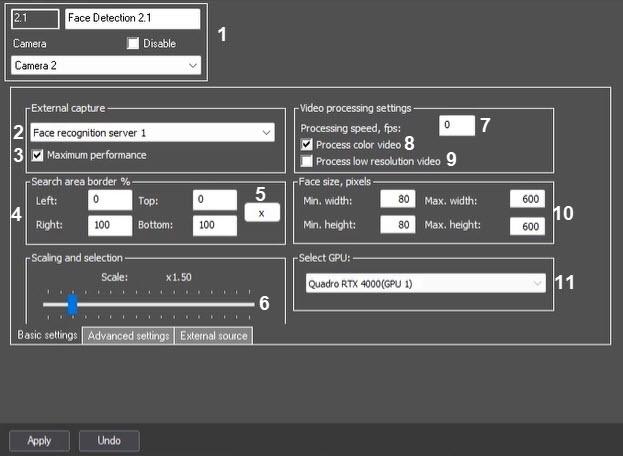
Description of parameters is given in the table:
№ | Parameter | Method of setting the parameter value | Parameter description | Representation | Default value | Value range |
|---|---|---|---|---|---|---|
| The Settings group | ||||||
1 | Identification number | Automatically | Displays the identification number of the Face Detection object in the system | Sequence of numbers | NA | Depends on the number of Face Detection objects in the system |
Name | Enter the value into the field | Name of the Face Detection object in the system | Latin and Cyrillic letters, service characters | Face Detection | A line containing a sequence of any characters (letters, digits, service characters), regardless of the register | |
Disable | Set the checkbox | Specifies the status (enabled or disabled) of the Face Detection object in the system | Boolean type | Clear | Set—the Face Detection object is disconnected and is not in use | |
Camera | Select the value from the drop-down list | Specifies the Camera parent object for a particular Face Detection object | Names of the Camera objects registered in the system | Name of the Camera parent object | Depends on the number of Camera objects in the system | |
| The External capture group | ||||||
2 | External capture | Select the value from the drop-down list | Selects the Face recognition server object required for recognition | Names of the Face recognition server objects registered in the system | No | Depends on the number of Face recognition server objects in the system |
| 3 | Maximum performance | Set the checkbox | Enables the maximum performance mode | Boolean type | Set | Set—the maximum quality of face capture and recognition is provided by using all available processor cores and increasing RAM consumption Clear—normal resources consumption, faces can be missed while capturing |
| The Search area border % group | ||||||
| 4 | Left, Right, Top and Bottom | Enter the value into the field | Specifies the border of the face search area in the video as a percentage of the corresponding sides of the frame Note. Setting the face search area border is available only if VA or VideoIntellect 1.1 face recognition module is Recognition module VA or Recognition module VI is used | The percentage of the left, right, top and bottom sides of the frame | Left = 0 Right = 100 Top = 0 Bottom =100 | From 0 to 100 |
| 5 | X button | Click the button | Specifies the border of the face search area in the video using the interactive interface | NA | NA | NA |
The Scaling and selection group | ||||||
| 6 | Scale | Move slider bar to the required position | Specifies the scale of the captured face in the frame for recording and highlighting the face with a dynamic frame | NA | 1.5 | From 1 to 5 1—only the captured face is recorded 5—the whole frame is recorded |
| The Video processing settings group | ||||||
| 7 | Processing speed, fps | Enter the value into the field | Specifies the number of frames of the video stream processed per second by the Face Detection module. This parameter is used to decrease the server load | Frames/sec | NA | From 1 to the frequency of frames allocated for processing the video signal of each specific camera |
| 8 | Process color video | Set the checkbox | Enables/disables the conversion of color video to black and white for generating vectors from black and white frames | Boolean type | Set | Set—vectors will be generated based on color frames Clear—color video will be converted to black and white to generate vectors from black and white frames |
| 9 | Process low resolution video | Set the checkbox | Enables processing of video images in 320x240 pixels resolution by the Face Detection module | Boolean type | Clear | Set—video image is processed in the 320x240 pixel resolution Clear—video image is processed in the resolution set for the Camera parent object |
| The Face size, pixels group | ||||||
| 10 | Min.width, Min.height, Max.width and Max.height | Enter the value into the field | Specifies the minimum and maximum width and height of the face on the video image in pixels | Natural number series with zero included | Min.width width =80 Min.height height =80 Max.width width = 600 Max.height height =600 | From 0 and more |
| 11 | Select GPU | Select the value from the drop-down list | Selects a video card for recognition for the Tevian VA and VisionLabs modulesVL recognition module. The Use GPU checkbox must be set on the settings panel of the Face recognition server object | Names of video cards in the system | NA | Depends on the number of available video cards |
...
Description of parameters is given in the table:
№ | Parameter | Method of setting the parameter value | Parameter description | Representation | Default value | Value range |
|---|---|---|---|---|---|---|
| The Face capture area pixelization group | ||||||
1 | Pixelize area | Set the checkbox | Enables the pixelation function for the area of video image in which the face was recognized | Boolean type | Clear | Set—face capture area is pixelated Clear—face capture area is not pixelated |
2 | Grain size | Move slider bar to the required position | Sets the grain size of face capture area pixelation | Sequence of numbers | 5 | From 5 to 15 |
3 | Enable face recognition upon request | Set the checkbox | Enables face recognition upon request | Boolean type | Clear | Set—face recognition upon request is enabled Clear—face recognition upon request is disabled |
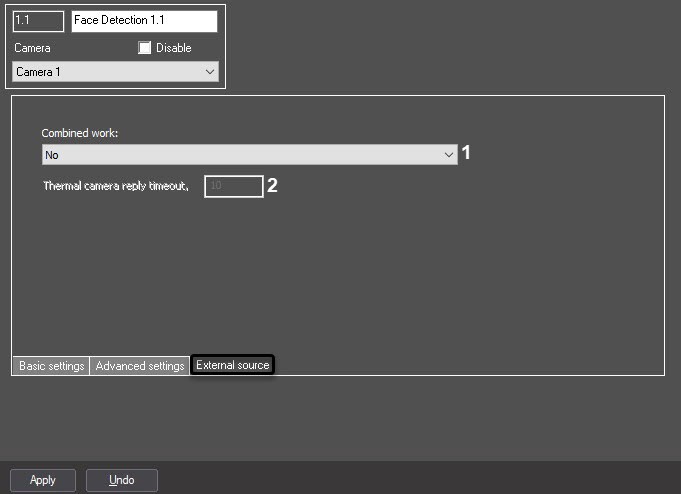
Description of parameters is given in the table:
№ | Parameter | Method of setting the parameter value | Parameter description | Representation | Default value | Value range |
|---|---|---|---|---|---|---|
| 1 | Combined work | Select the value from the drop-down list | Specifies the combined operation mode with a thermal camera or an external system | List | No | No—combined operation mode is not used Combine with thermal camera temperature—receiving the temperature and coordinates of a captured face frame from the thermal camera. A photograph of a captured face will be obtained from the capturing camera Get photo from thermal camera—receiving the temperature and photos of a captured face from the thermal camera Get photo and metadata from external system—receiving the temperature and photos of a captured face from a thermal camera or Axxon One |
| 2 | Thermal camera reply timeout | Enter the value into the field | Specifies the timeout for receiving data from the thermal camera Note. This setting is available only if the Combine with thermal camera temperature mode is selected | Time in seconds | 10 | >=0 |
Overview
Content Tools