
Go to documentation repository

Documentation for Axxon Next 4.5.0. Documentation for other versions of Axxon Next is available too.
Previous page Next page

The detection tool will trigger if an object stops and remains idle for a specified time period.
Note
The object doesn't have to be completely idle, minor jitter is permitted.
To set a specified time period, you must perform the following steps:
- In the Detection Tools list, highlight a Stop in area object (1).
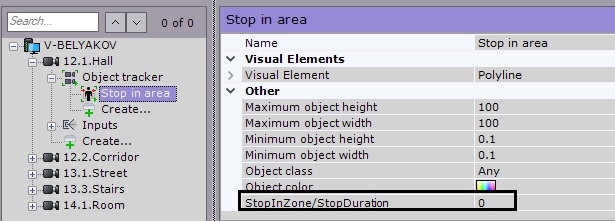
Set the idle period duration for triggering the tool. This value should fall into the range of [0, 3600].
Attention!
Set this parameter to a value lower than the Time of Object in DB in Object tracker settings (see Ogólna konfiguracja Analizy wideo).
- Click the Apply button.
Overview
Content Tools