
Go to documentation repository

Documentation for Axxon One 2.0. Documentation for other versions of Axxon One is [available too].
Previous page Next page

To search for moments when objects gather in an area:
- In the Viewing Tile, define the area to be analyzed during search in accordance with the selected condition (see 영역 내 움직임).
- Select the metadata source if there are several for this video camera (1). This parameter will not be displayed if there is only one source.
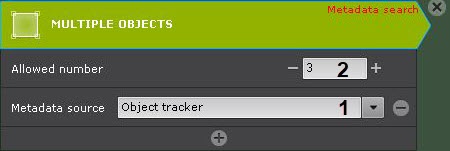
- Specify the number of objects allowed in the area (2). Search results contain recorded video in which the number of objects in the area exceeds the specified number.
- Specify any number of additional parameters by clicking
 , if necessary (see Configure the search parameters).
 - Set the search interval (see 검색 간격 설정).
Click the Search button.
Note
Once launched, the search can be stopped at any time. To do this, click the Stop button which appears instead of the Search button.
The found moments will be displayed in the search results panel.
Overview
Content Tools