
Go to documentation repository

Documentation for Axxon PSIM 2.0. Documentation for other versions of Axxon PSIM is available too.
Previous page Next page

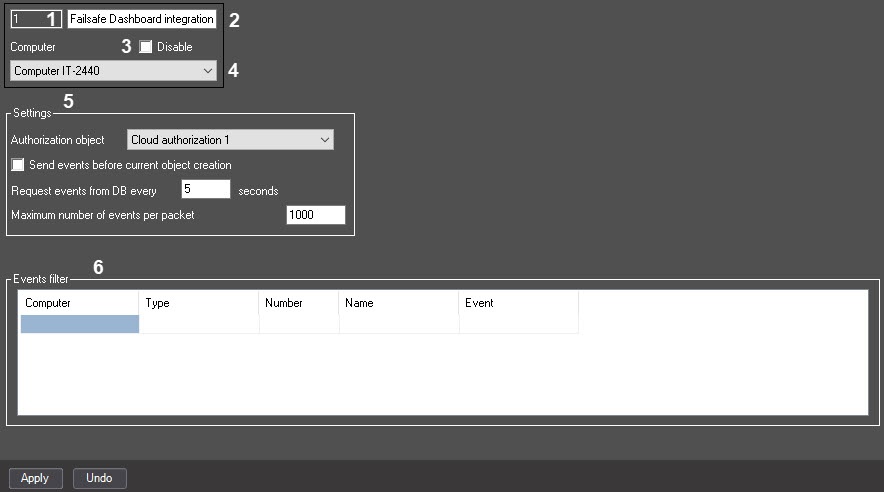
№ | Parameter | Method of setting the parameter value | Parameter description | Representation | Default value | Value range |
1 | The Identification number* | Automatically | Displays the identification number of the Failsafe Dashboard integration client object | Sequence of numbers | NA | Depends on the number of the Failsafe Dashboard integration client objects in the system |
2 | The Name* | Enter the value in the field | Sets the name of the Failsafe Dashboard integration client object | Latin alphabet, Cyrillic, digits, and service characters | Failsafe Dashboard integration client | A line containing a sequence of any characters (letters, digits, service characters except > and < characters), case-insensitive. Number of characters—from 1 to 60 |
3 | The Disable | Set the checkbox | Disables the Failsafe Dashboard integration client object | Boolean type | Clear | Set—the Failsafe Dashboard integration client object is disabled and isn't used Clear—the Failsafe Dashboard integration client object is enabled and used |
4 | The Computer | Select the value from the list | Sets the Computer parent object for the given Failsafe Dashboard integration client object | List of names registered in the Computer objects system | Name of the Computer parent object | Depends on the number of the Computer objects in the system |
| The Settings group | ||||||
5 | The Authorization object | Select the value from the list | Specifies the authorization object | List of names registered in the objects authorization system | NA | Depends on the number of the created objects |
The | Set the checkbox | Enables the option of sending events before the current object creation | Boolean type | Clear | Set—events that occur before the current object creation are sent Clear—events that occur before the current object creation aren't sent | |
The Request events from DB every_ seconds field | Enter the value in the field | Specifies the time period after which the events request from the database is performed | Sequence of numbers | 5 | From 0 to 999999999 | |
The Maximum number of events per packet field | Enter the value in the field | Specifies the maximum number of events per packet | Sequence of numbers | 1000 | From 0 to 999 | |
| The Events filter table | ||||||
6 | The Computer drop-down list | Select the value from the list | Sets the Computer object | List of names registered in the computers system | NA | Depends on the number of the registered computers in the system |
The Type drop-down list | Select the value from the list | Sets the object type that is controlled by the specialized keyboard | List of names registered in the object types system | NA | Objects registered in the system | |
The Number drop-down list | Select the value from the list | Sets the object identification number | Sequence of numbers | NA | Depends on the number of the registered object types in the system | |
The Name field | Automatically | Specifies the object name that is controlled by the specialized keyboard | List of names of the specified type registered in the object system | NA | Depends on the number of the created devices of the selected type in the system | |
The Event drop-down list | Select the value from the list | Specifies the event name | List of event types for the selected device type | NA | List of events depends on the selected object | |
*Name of the element isn't displayed in the settings panel of the given object
Overview
Content Tools