
Go to documentation repository


You can use the NGP manager hardware object to set up integration with Axxon One. You can create only one NGP manager object per one Axxon PSIM server, so if you need integration with several Axxon One domains, you must use several Axxon PSIM servers.
On this page:
Create the NGP manager object
- Go to the Hardware tab in the system settings.
- Right-click the Computer object, and in the context menu that opens, select Create object → NGP manager.
Note
The Computer object must correspond to the Axxon PSIM server that is selected for integration.
- The number and name are entered into the fields automatically. If necessary, you can change them.
- Click the Apply button.
As a result, three objects are created: NGP manager, along with the ONVIF Server (NGP manager) and RTSP Server (NGP manager) objects associated with NGP manager. The ONVIF Server (NGP manager) and RTSP Server (NGP manager) objects are used to set up integration using the Axxon One web server. You don't need to delete or configure them; they must remain as they are.
Configure the NGP manager object
- Select the created NGP manager object in the hardware tree.
- On the Integration with NGP tab, set the Enable checkbox.
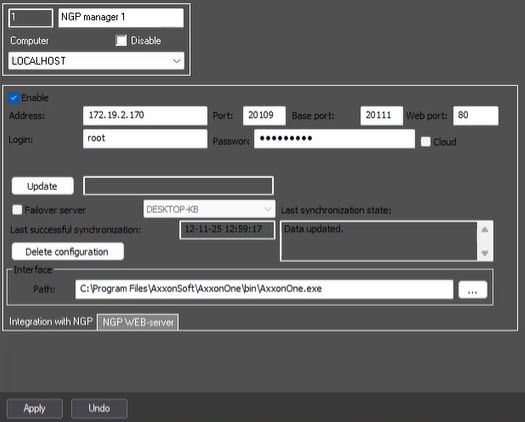
- Enter the information of the Axxon One instance you are connecting to:If you use a cloud connection for authorization in Axxon One, set the Cloud checkbox.
Field Description Default value Address IP address 127.0.0.1 Port Port for communication with the client (NativeBL port) 20109 Base port Port for operations within a domain 20111 Web port Web server port (HTTP port for failover server) 80 Login Axxon One username root Password Axxon One password root Note
The connection ports depend on the type of Axxon One installation (failover or not) and its settings. For more information, see the Axxon One documentation:
- Click the Update button to synchronize with Axxon One. This button initiates reading and updating of the Axxon One configuration to retrieve information and send it to Axxon PSIM:
Attention!
Specifics of synchronization with Axxon One using the Update button:
- After you click the button, you must wait for the process to complete without taking any further actions. This ensures that the states of Axxon One objects are correctly transferred.
- If the configuration of a running Axxon One server was previously retrieved and during the next synchronization the server status is "off," the hardware state in Axxon PSIM remains unchanged. This is done to prevent accidental configuration clearing, for example, if the Axxon One server is rebooting during synchronization.
- If you enter data of a new Axxon One domain for synchronization, the data of the previously synchronized domain are deleted. If synchronization is done with a server from the same domain, the data remain.
- The hardware list, which was already retrieved, is synchronized between Axxon PSIM and Axxon One on the fly. However, to obtain information about new hardware or changes in the Axxon One configuration, you must click the Update button again.
- If you delete devices and macros received from Axxon One (and they remain in Axxon One) in Axxon PSIM, they are recreated in Axxon PSIM during the next synchronization.
- Hardware objects retrieved from Axxon One are created in Axxon PSIM without settings panels, as they can only be configured in Axxon One.
- Macros are created without predefined conditions, but you can configure them if needed. For more information, see Working with macros and events received from Axxon One.
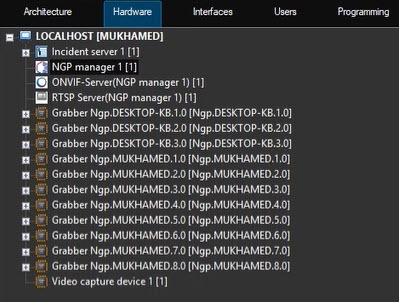
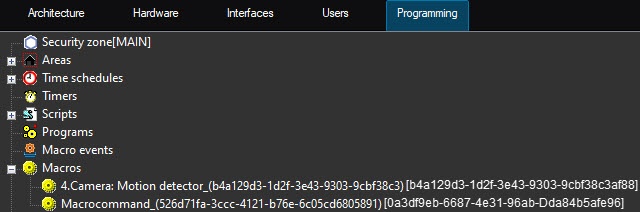
The result of the synchronization is displayed in the information fields Last successful synchronization and Last synchronization state. If the synchronization is successful, the hardware received from Axxon One appears in the hardware list, and the received macros appear in the Macros list on the Programming tab:
- If you connect to the Axxon One failover server, set the Failover server checkbox and select from the drop-down list on the right, the server whose cameras are displayed in the NGP monitor window. If you connect to a regular server, not the Axxon One failover server, you can skip this step.
- If you have the Axxon One client preinstalled, then when you create an integration object, the Path field will automatically contain the path to the Axxon One root folder (see Preconfiguration of Axxon One). This path is used to launch the NGP monitor interface object. If you don't have Axxon One installed, the field remains empty. In this case, you need to install Axxon One and enter manually either the path to the Axxon One root folder or the gui_safe_mode.exe path if you are using an older version of OpenGL (see Create and configure the NGP monitor object).
Attention!
Note that this path must be the same on all computers where you want to run the Axxon One client AxxonOne.exe. This means that the Axxon One client must be preinstalled in the same folder on all computers.
- Click the Apply button.
Integration with Axxon One is complete.
Delete the Axxon One configuration
To completely delete the integration with Axxon One configured as described above, do the following:
- Make sure that the last synchronization with Axxon One was successful (check the Last successful synchronization and Last synchronization state fields). If necessary, click Update to synchronize.
- On the settings panel of NGP manager, click the Delete configuration button.
- The Delete configuration window opens. Click OK to confirm.
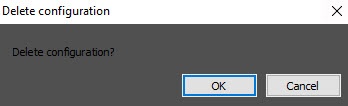
As a result, all hardware and macro lists associated with this integration will be deleted. If you configured the NGP monitor interface object, its camera list will also be cleared accordingly.
Overview
Content Tools