
Go to documentation repository
Previous page Next page
The program window for viewing reports contains the following interface elements: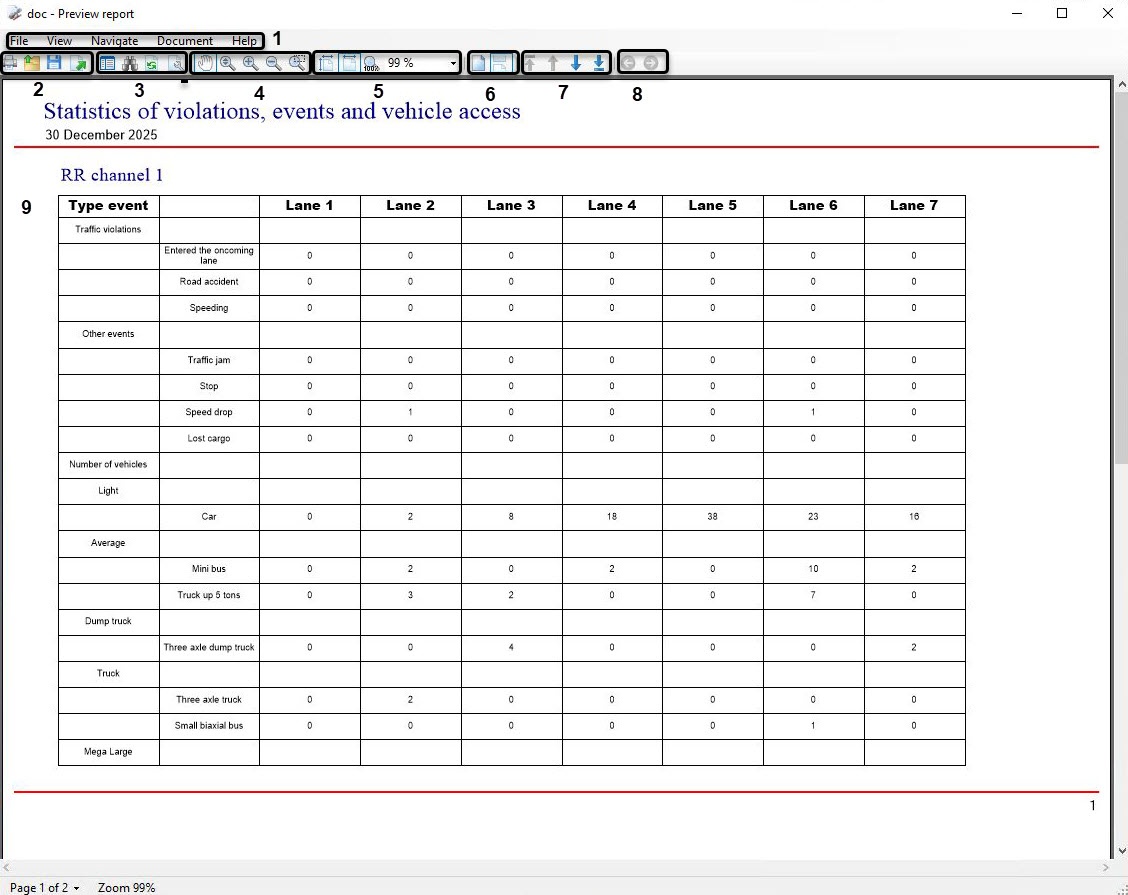
Description of the program interface elements for viewing reports.
| Number of the element | Description of the element |
|---|---|
| 1 | The main program menu for viewing reports (file operations, viewing operations and report navigation, working with report, viewing the information about program) |
| 2 | The block of elements for operations with the report file (printing, opening, saving, exporting a file) |
| 3 | The block of elements for operations with a report (displaying a content, searching, refreshing, editing) |
| 4 | Selects the scale mode and the scale of the report display |
| 5 | Zooms in and out a report |
| 6 | Selects the report display mode (displaying pages one by one, continuous page-by-page display) |
| 7 | The block of elements for navigating through a report |
| 8 | Cancels the last action or switches to the previous one |
| 9 | The field for displaying the created report |

