
Go to documentation repository

Documentation for Axxon PSIM 2.0. Documentation for other versions of Axxon PSIM is available too.
Previous page Next page

The settings panel of the Cloud authorization system object is shown in the figure.
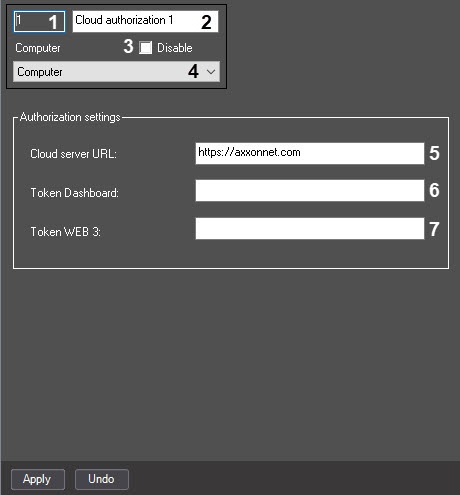
The description of the parameters of the Cloud authorization system object is given in the table.
№ | Parameter name | Method of setting the parameter value | Parameter description | Representation | Default value | Value range |
1 | The Identification number* | Automatically | The identification number of the Cloud authorization system object is displayed | Sequence of numbers | NA | Depends on the number of Cloud authorization objects in a video surveillance system with a distributed architecture |
2 | The Name* | Enter the value in the field | Sets the name of the Cloud authorization object in a video surveillance system with a distributed architecture | Latin alphabet, Cyrillic alphabet, digits, and service characters | Cloud authorization | A line containing a sequence of any characters (letters, digits, and service characters except > and < characters), case-insensitive. Number of characters—from 1 to 60 |
3 | The Disable | Set the checkbox | Disables the Cloud authorization object in a video surveillance system with a distributed architecture | Boolean type | Clear | Set—the Cloud authorization object is disabled and isn't used Clear—the Cloud authorization object is enabled and used |
4 | The Computer drop-down list | Select the value from the list | Set the Computer parent object for this Cloud authorization object | The list of Computer objects registered in the system | The name of the Computer parent object | Depends on the number of the Computer objects in the system |
The Authorization settings group | ||||||
5 | The Cloud server URL field | Enter the value in the field | Set the URL address of the cloud server | Latin alphabet, digits, and service characters | A line containing a sequence of characters (letters, digits, and service characters), case-insensitive | |
6 | The Token Dashboard field | Enter the value in the field | Sets the token for authorization of the Web server 2.0 object obtained in the cloud. Note. For information on how to get a token for AxxonNet, see Configuration of a domain in AxxonNet | Latin alphabet, digits, and service characters | NA | A line containing a sequence of characters (letters, digits, and service characters), case-insensitive |
7 | The Token WEB 3 field | Enter the value in the field | Sets the token for authorization of the WEB server 3.0 object obtained in the cloud. Note. For information on how to get a token for AxxonNet, see Configuration of a domain in AxxonNet | Latin alphabet, digits, and service characters | NA | A line containing a sequence of characters (letters, digits, and service characters), case-insensitive |
*The name of the element isn't displayed in the settings panel of the object
Overview
Content Tools