If an archive is created from an existing volume, it will be possible to extract saved video from the file only if the following conditions are met:
- The name of the computer on which the recording was written to the existing archive volume is the same as the name of the current computer.
- The IDs of the video cameras from which the recordings were written to the existing archive volume are the same as the IDs of the current video cameras.
To create an archive based on an existing volume:
- Create an archive.
Configure archive volumes. For each disk that contains existing volumes that are to be included in the new archive:
A new archive can contain volumes that previously belonged to different archives |
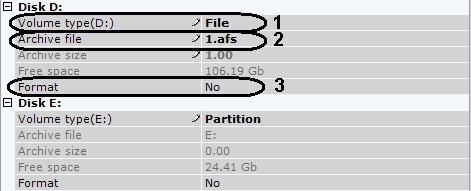
- In the Volume type list, select the type of the existing volume on the partition (1).
- If the volume is in file form, select the archive file to which recording was performed (2).
In the Format list, select No (3).
If you select Yes, all saved video on the volume will be erased |
If necessary, create new archive volumes on free partitions.
Click the Apply button.
The archive is created and, if all requirements are met, the archive recordings are available.