The platform calculator allows setting maximum CPU load. On the basis of this parameter the number of Servers is calculated.
To set maximum CPU load, do the following:
- Click the Settings button on the Platform Calculator page.

- The box for setting calculator parameters is displayed.
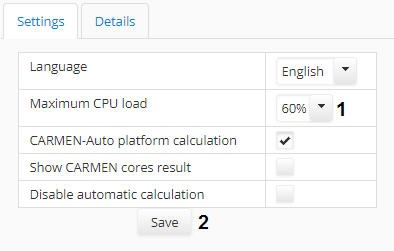
- Select the required value of maximum CPU load in the Maximum CPU load (1) dropdown list.
- Click the Save (2) button. The changes will be saved and the box will be closed.
The maximum CPU load is now configured.