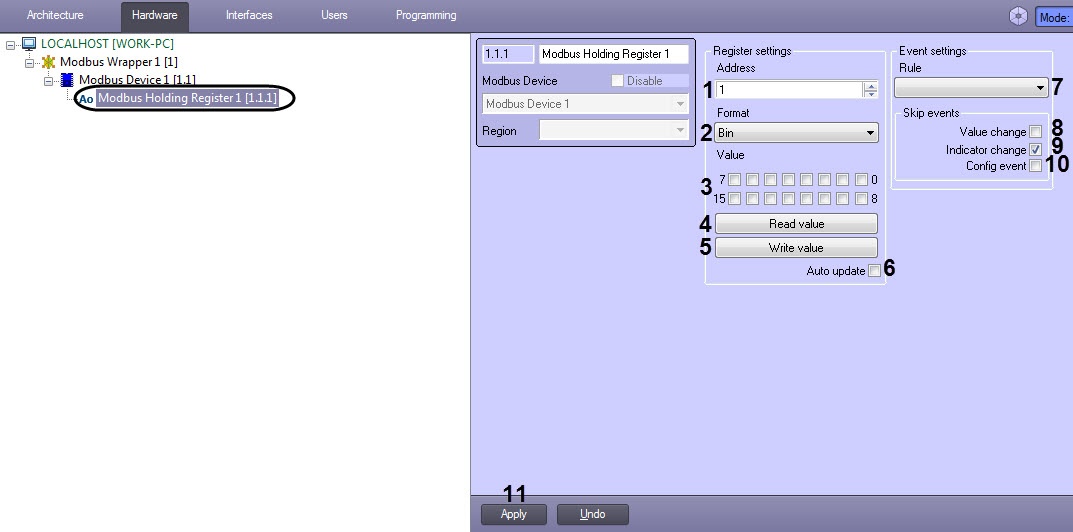
By Modbus Holding Register, the Analog Output or the Register containing some values which can be either written or read is meant. The register size is 2 bytes.

The Modbus Holding Register is configured as follows:

  1. Go to the Modbus Holding Register object settings panel which is created on the basis of the Modbus Device object.
  2. In the Address field (1), enter the Holding Register address in the register map of this device.

    The register map is provided by the vendor.


  3. From the Format drop-down list (2), select the register data format:
  4. The Value area (3) displays the current Register value in the selected format. You can also specify the value manually.
  5. Click the Read value button (4) if it is necessary to read the device register.
  6. Click the Write value button (5) if it is necessary to specify the selected value to the device register.
  7. Set the Auto update checkbox (6) if it is necessary to automatically read the register values with the interval specified on the Modbus Device object settings panel.
  8. From the Rule drop-down list (7), select the rule to which this Register will obey (see Configuring the Modbus Rule).
  9. Set the Value change checkbox (8) if it is not necessary to display the events on the register value change in the Event Log
  10. Uncheck the Indicator change checkbox (9) if it is necessary to allow displaying of the register values in the plain text on the map.

    Value change of this parameter will be applied after restarting the ACFA-Intellect Server.


  11. Set the Config event checkbox (10) if it is not necessary to display the events in the Event Protocol when the rule is triggered.
  12. Click Apply (11) to save changes.

The Modbus Holding Register is now configured.