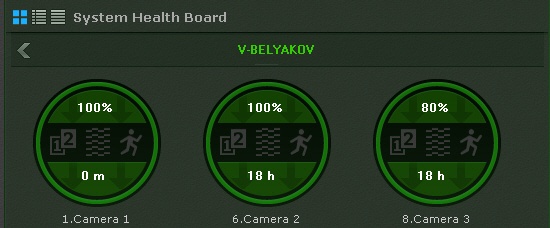
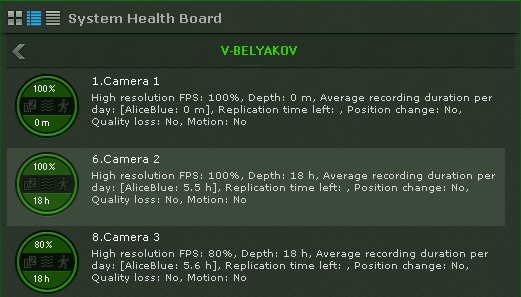
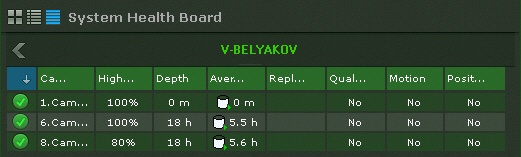
Dane na temat statusu kamer mogą być wyświetlane na trzy sposoby, zależnie od przycisku zaznaczonego w lewym górnym rogu panelu:
Odłączone kamery są wyświetlane na końcu listy; są one przyciemnione. |
Tabele mogą być sortowane po dowolnej kolumnie.
Następujące informacje są wyświetlane dla każdej kamery:
Procentowy współczynnik FPS wyświetlanego materiału wideo do wartości FPS zawartej w ustawieniach strumienia wideo wysokiej jakości kamery (zobacz: Obiekt typu Kamera).
Średni czas nagrywania (w godzinach dziennie) jest współczynnikiem całkowitego czasu nagrywania do wieku archiwum / czasu retencji nagrań (czasu od najstarszego dostępnego nagrania do czasu obecnego).
For constant recording, this parameter value is equal to 24 hours. If the recording takes 50 percent of total time, the value is 12 hours. |
The camera status is measured based on the signal from the camera and stream rate:
Information is updated every ten seconds.
If there is no signal from a camera, the appearance of the diagram changes accordingly.
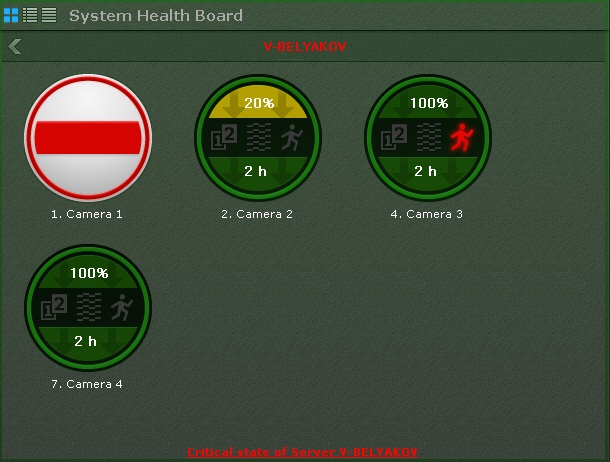
Information about detection tools is received in real time. Depending on the status of detection tools, the corresponding icons change color: