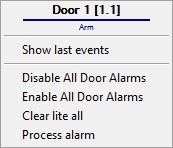
The Symmetry Door is managed in the Map interactive window using the Door object functional menu:
The Symmetry Door object functional menu commands description is given in the table.
Menu command | Function performed |
|---|---|
| Disable All Door Alarms | Disable all alarms |
| Enable All Door Alarms | Enable all alarms |
| Clear lite all | Clear alarms |
| Process alarm | Confirm the alarm |
The Symmetry Door object can have the following states:
| Alarm |
| Arm |
| Open |
| Locked |
| Closed |
| Cable fault Open |
| Cable fault Short |
| Unlocked |


