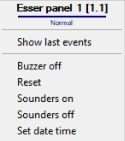
The Esser panel is managed in the Map interactive window using the Esser panel object functional menu:
The Esser panel object functional menu commands description is given in the table:
Menu command | Function performed |
|---|---|
| Buzzer off | Switching off the buzzer of the panel |
| Reset | Perform a reset of the control panel - corresponds to pressing the reset on the front panel of the device |
| Sounders on | Turning on the sound signaling devices |
| Sounders off | Turning off the sound signaling devices |
| Set date time | The time of the control panel will be set according to the Intellect server time |
The Esser panel can have the following states:
|
|
Normal |
|
|
CPU failure |
|
|
Delay on |
|
|
Delay time running |
|
|
Verification time running |
|
|
Panel reset active |
|
| Accu fault/Power fault/Earth fault/ Power supply fault/ Printer fault/ Module selftest fault |
|
| Cover contact open |
|
| Link lost |
|
| Sounders off |
|
| Fire |
|
| Revision started |
|
| Child disabled |


