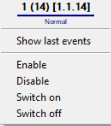
The Esser Control Subset is managed in the Map interactive window using the Esser Control Subset object functional menu:
The Esser Control Subset object functional menu commands description is given in the table:
Menu command | Function performed |
|---|---|
| Enable | Turned on |
| Disable | Turned off |
| Switch on | Active state |
| Switch off | Inactive state |
The Esser Control Subset can have the following states:
|
| Normal |
|
| Fault |
|
| Disabled |
|
| Activation |
|
| Blocking |
|
| Test mode |
|
| Link lost |


