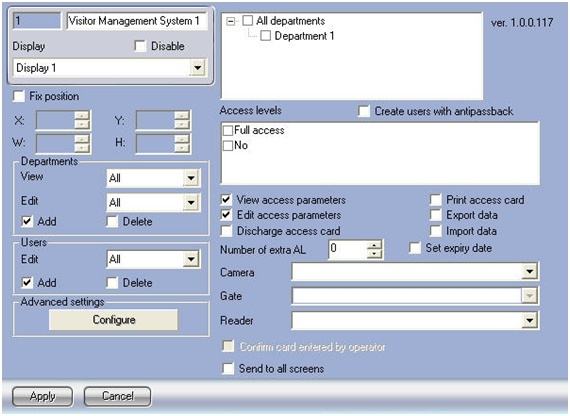
The Advanced settings window will open.
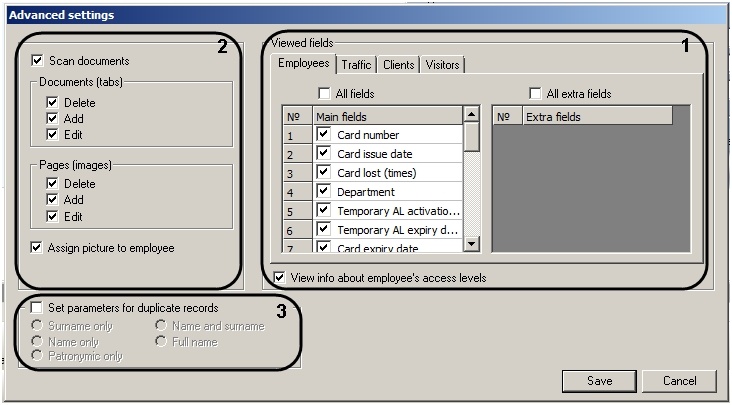
On each tab check the box next to the fields to be displayed on the user pane of the corresponding department (1).
If all basic fields or all advanced fields should be displayed, check the All fields and All extra fields boxes, respectively. - If user access levels should be displayed, check the corresponding box (1).
- In the Documents (tabs) settings group, check the boxes next to the actions that the Visitor Management System module operator will be allowed perform with documents in the Scanning documents application (2).
- In the Pages (images) settings group, check the boxes next to the actions that the Visitor Management System module operator will be allowed perform with images in the Scanning documents application (2).
- To enable the ability to assign a photograph to users from the Scanning documents application, check the Assign picture to employee box (2).
- Check the Set parameters for duplicate records box if Visitor Management System module operator should be warned about duplicate user accounts when creating a new record (3).
Set the radio button to the desired criteria for identifying duplicate records.
Criteria for duplicate records:Criteria
Description
Surname only
A new record will be considered a duplicate if the user's surname matches that of a previously created user.
Name only
A new record will be considered a duplicate if the user's name matches that of a previously created user.
Patronymic only
A new record will be considered a duplicate if the user's patronymic matches that of a previously created user.
Name and surname
A new record will be considered a duplicate if the user's name and surname match those of a previously created user.
Full name
A new record will be considered a duplicate if the user's full name matches that of a previously created user.
To save changes and return to the Visitor Management System object's settings pane, click Save.
| To return to the Visitor Management System object's settings pane without saving changes, click Cancel. |