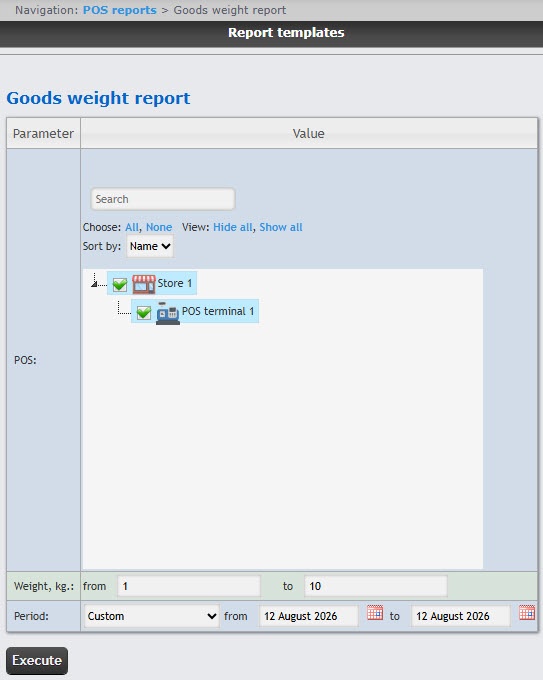
In order to create the goods weight report, you must first create and configure the POS terminal object in POS PSIM (see The POS terminal object setup). The goods weight report is generated only when you use SQL starting from the SQL2017 version. If an earlier version is installed, for example, SQL2014, the goods weight report will not be generated. |
You can use templates when you create a report. To add a new template, click Report templates → New template and fill in the Name and Description fields. The template will use the selected parameters of the current report. Templates work the same way as templates in the scheduler and can be used interchangeably. When you create a response using a template, click Report templates at the top of the page and select the required template from the list of saved templates (the required template is highlighted). As a result, the parameters of the current report are updated according to the selected template. |
To create the goods weight report:

From the POS drop-down list, select the POS terminals for which the report will be created. To select all available/found POS terminals, click All. To deselect, click None. To expand the POS terminal structure, click Show all. To hide the POS terminal structure, click Hide all.
This field is mandatory: the report will not be generated if no value is selected. If you try to generate a report, a warning message will alert you that you must select at least one value from the list. |
From the Period drop-down list select the time period for which the report must be created.
If you select the Custom period, enter the dates of the start and end periods in the from and to fields using the Calendar tool.
Click the Execute button.
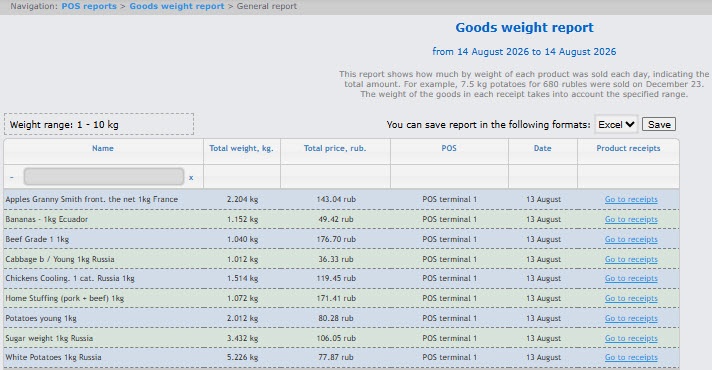
As a result, a summary table of the events by the goods weight will be displayed according to the specified parameters. To go to the detailed report on the specified goods, click the Go to receipts link of these goods.

To save the general goods weight report in .xls format, click the Save button.
The goods weight report is created.