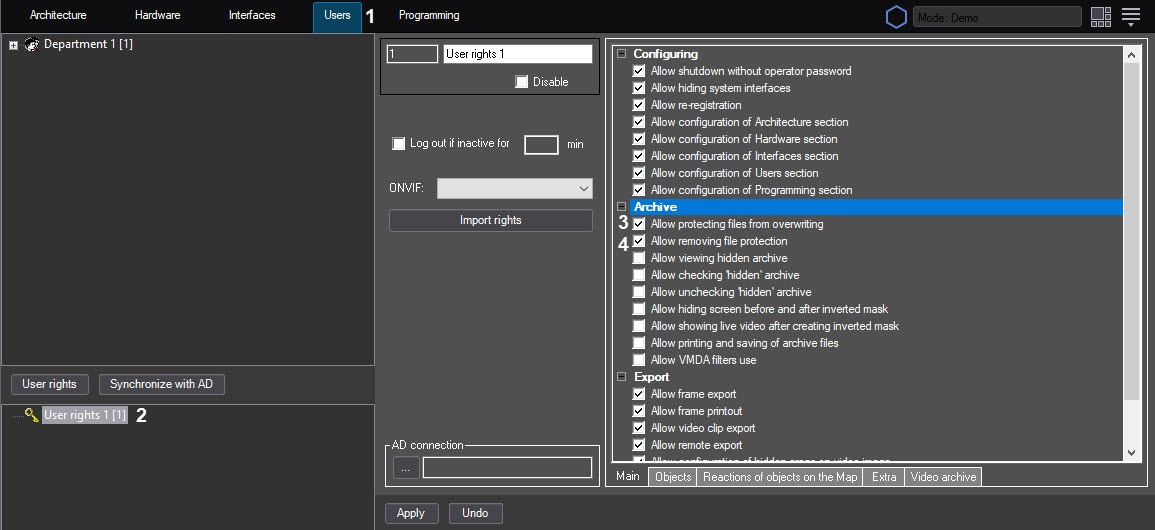
The settings panel of the User rights object is displayed in the right part of the System settings window.
In Axxon PSIM, archive recording is performed on a loop (see the General information on video archiving). Due to this, old archive recordings can be replaced by new ones. By default, the operator who isn't assigned user rights can protect files from being overwritten, as well as remove protection from the files.
Protected files are moved to the PROTECTED folder in the VIDEO folder on the disk with the archive. When you remove file protection, it is moved back to the folder from which it was taken if it still exists. If you have already removed this folder since all files in it were overwritten, the file remains in the PROTECTED folder but isn't displayed in the surveillance monitor. Later, this file is deleted by loop recording.
By default, the operator who is assigned user rights cannot protect files from being overwritten or disable this protection. To give the rights to manage the protection of archive files:
Configuration of operator rights to protect archive files from overwriting is complete.