- Fingerprint or card—access will be granted when a fingerprint is scanned or access card is brought to the scanner.
- Card and fingerprint—access will be granted when the access card is brought to the scanner and the fingerprint is scanned within 10 seconds after the card is brought to the scanner.
Fingerprint on card—access will be granted after a positive comparison of the fingerprint template on the Mifare card and the user's fingerprint brought to the scanner within 10 seconds after the Mifare card.
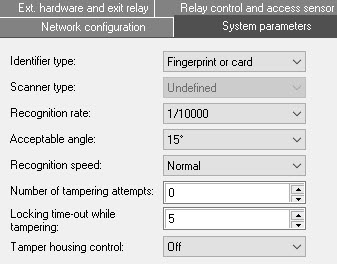
The Scanner type parameter is filled in automatically.
From the Recognition rate drop-down list, select the probability of false identification by fingerprint. The recommended value is 1/100000.
 button to save the changes.