You can use the Logon to automatically log out and/or lock the client if the system user is inactive for a certain period of time, that is, there are no signals from input devices (keyboard, mouse, or joystick).
The feature of Axxon One autostart is also available, which replaces the standard Windows OS shell. You can use autostart when it is necessary to restrict the use of the base computers of the digital video surveillance system: prevent the start of various apps, copying and deletion of files, working with Windows OS windows, and other non-standard computer usage. If you configure autostart instead of the standard Windows OS shell, Axxon One launches immediately after the Windows OS boots, instead of Explorer. This prevents the user from launching various apps installed on this computer and interacting with program dialog windows.
To specify the required settings:
- Go to the Settings tab → Options → Special options → Logon.
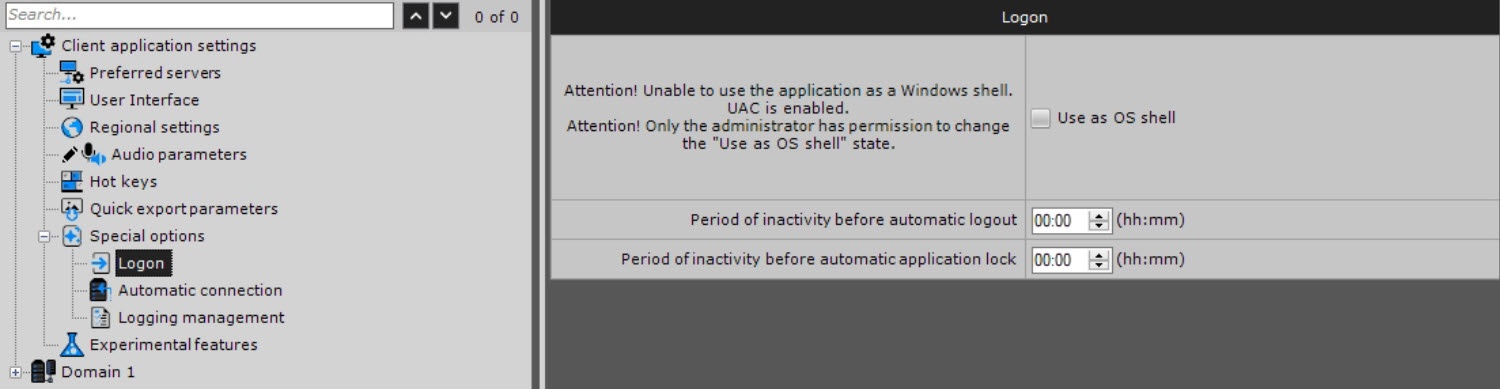
- Specify the required settings listed in the table:
| Parameter | Value | Description |
|---|
| Logon |
| Use as OS shell | | By default, the standard Windows OS shell is launched (the checkbox is clear). If you want to enable Axxon One autostart instead of the standard Windows OS shell, set the checkbox. The next time you start Windows OS, Axxon One launches instead of the standard shell |
|
| Period of inactivity before automatic logout | (hh:mm) | The default value is 00:00. Specify the time of user inactivity before automatic logout. If you don’t specify the parameter or set it to 00:00, the user doesn’t automatically log out. The value must be in the range: |
| Period of inactivity before automatic application lock | (hh:mm) | The default value is 00:00. Specify the time of user inactivity after which the client must be locked. Re-authentication is required to continue using the client. If you don’t specify the parameter or it is set to 00:00, the client isn’t locked. The value must be in the range: |
- Click the Apply
 button. To cancel the actions, click the Cancel
  button.
Configuration of autostart, automatic client logout, and automatic client lock is complete.

