If port 20111 is busy during installation of Axxon One (for example, because of nethost.exe processes that have not been unloaded since removal of the previous version), an error message regarding the launch of NGP Host Service appears.
To continue installation, free up port 20111 and try again.
In some cases, you may encounter errors while installing Drivers Pack:
Installation failed because the Universal C Runtime is not installed. Please run Windows Update and install all required Windows updates(KB2999226). You can download the UCRT separately from here: 'https://support.microsoft.com/en-us/kb/2999226'. |
This can be solved by installing the Windows update KB2999226.
After installation of the Postgres database, the Axxon One installer may quit prematurely. This situation may be associated with the inability of the installer to connect to the Postgres database if the firewall is enabled. To prevent this, disable your firewall during installation.
Disabling the firewall during installation can cause another problem (see Camera). |
An error can occur when you install and work with Smart App Control at the same time. To fix it, we recommend doing the following:
When you install Axxon One on Windows 10.0.17763 and up, you may see the Create Recovery Archive error message.
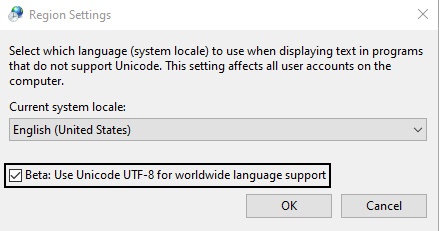
To fix the error, do as follows:
Installing the Axxon One Server on Windows with the language pack Norsk (bokmål) is not possible due to incompatibility with PostgreSQL.
You must install the Norsk Language Pack (nynorsk).
Axxon One is not guaranteed to work on Windows N or KN editions. For correct operation, you must install the Media Feature Pack.