필요한 경우, 고급 이미지 분석(Advanced image analysis)을 활성화하십시오 (1). 이 기능을 활성화하면 인식 품질이 향상됩니다. 특히, 카메라의 특성이나 설정이 요구사항을 완전히 충족하지 않거나 날씨가 좋지 않은 상황에서 유용합니다. 프레임의 처리 시간이 프레임 크기에 따라 20~30% 증가할 수 있습니다. 일반적인 조건에서는 인식 품질에 영향을 주지 않습니다.
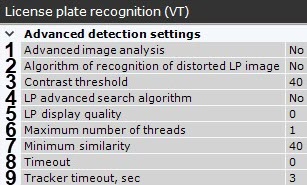
화각(FOV) 내에서 다양한 크기의 번호판이 예상된다면 번호판 고급 검색 알고리즘(LP advanced search algorithm)을 활성화하십시오 (4). 이 설정은 번호판의 최대 및 최소 너비를 고려하며, 경우에 따라 인식 품질을 높이고 CPU 부하를 최적화하는 데 도움이 됩니다.
번호판 인식 이벤트를 설정하려면:
- 정확한 번호판 인식 결과로 간주할 최소 유사도(%)를 설정하십시오 (7). 이 값은 인식 결과와 사전에 등록된 번호판 템플릿 간의 유사도 기준입니다. 이 값을 이용해 신뢰도에 따라 결과를 필터링할 수 있습니다.
기본적으로, 번호판을 포함한 트랙이 화각에서 사라진 후에 번호판 인식 이벤트가 등록됩니다. 등록 시점을 초 단위 타임아웃(8)으로 설정하거나, LP 표시 품질 필드(5)에 지정된 유사도 비율에 도달하는 시점으로 설정할 수 있습니다. 두 매개변수가 모두 0이 아닌 값으로 설정된 경우, 먼저 충족되는 조건에 따라 인식 이벤트가 등록됩니다.
LP 표시 품질 매개변수 값은 최소 유사도 값보다 낮아서는 안 됩니다.
인식 스레드의 최대 개수를 지정하십시오 (6). 이 값이 0이면, 인식 프로세스는 이를 시작한 동일한 스레드에서 실행됩니다.
모든 NPR 감지 도구에서 이 매개변수의 누적 값은 다음을 초과해서는 안 됩니다:
|
In the Tracker timeout, sec field, set a time interval in seconds after which the tracking of a vehicle is reset (9).
Use this setting to eliminate double-triggering in such cases as, for example, another recognition of the same number after it has been obstructed for some time, and then reappears in scene. If you set Tracker timeout to a value greater than a probable time of obstruction, the detection tool will not double-trigger. |
If necessary, set additional parameters. For more details, refer to the table.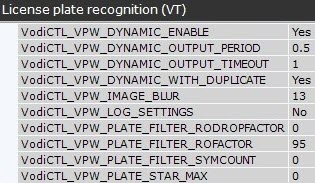
| Parameter | Description |
| VodiCTL_VPW_DYNAMIC_ENABLE | Enable/disable the number recognition dynamics (by default, the dynamics is enabled). If the value is Yes, then tracking is enabled, and the number is recognized by the set of frames. If the value is No, then tracking is disabled, and the number is recognized by each frame separately without taking to account the previous ones, and the quality can vary from 0 to 100% |
VodiCTL_VPW_DYNAMIC_OUTPUT_PERIOD | Time period (in microseconds) over which the recognition result is to be displayed to the user. This parameter can be used only if the VodiCTL_VPW_DYNAMIC_WITH_DUPLICATE parameter is set |
VodiCTL_VPW_DYNAMIC_OUTPUT_TIMEOUT | The minimum time required to monitor the license plate (in microseconds) before displaying the recognition result to the user. This parameter can only be used when the “Dynamic” mode is on. In this mode, the trajectory of the vehicle is monitored, and the user does not immediately receive the recognition result of the license plate, but after the time specified for this setting. In this case, the first recognition result will be replaced by the result of higher quality and subsequently displayed to the user. If parameter 0 is set for this value, the user gets the first result of recognizing the detected license plate. After the time specified in this parameter expires, the monitoring of the trajectory of the license plate continues until it disappears from the frame |
VodiCTL_VPW_DYNAMIC_WITH_DUPLICATE | Enable/disable the periodic output of license plate recognition results |
VodiCTL_VPW_IMAGE_BLUR | The parameter for internal use. The recommended value to set is 13 |
VodiCTL_VPW_LOG_SETTINGS | Enable/disable logging of all recognition parameters |
VodiCTL_VPW_PLATE_FILTER_RODROPFACTOR | The license plate filter coefficient by the so-called image density—ratio of white pixels to total pixels (second strategy). The type is unsigned. This coefficient is used for image threshold and has the optimal values, which are determined by developers using their own test samples. The parameter is considered as a service one, and its value should be set according to the recommendations of technical support specialists |
VodiCTL_VPW_PLATE_FILTER_ROFACTOR | The license plate filter coefficient by the so-called image density – ratio of white pixels to total pixels (first strategy). The type is unsigned. This coefficient is used for image threshold and has the optimal values, which are determined by developers using their own test samples. The parameter is considered as a service one, and its value should be set according to the recommendations of technical support specialists |
VodiCTL_VPW_PLATE_FILTER_SYMCOUNT | Enable/disable the simple license plates filter algorithm by the minimum number of recognized symbols on them. If the algorithm is enabled (the value of the parameter is greater than 0), the base search for symbols on the prospective license plate (geometry, proportions) is performed. If less symbols are recognized on the prospective license plate than specified in this parameter, this prospective license plate is not considered a license plate. That is, the value of this parameter is the minimum characters that must be present on the prospective license plate when the basic algorithm is in use |
VodiCTL_VPW_PLATE_STAR_MAX | Maximum unrecognized symbols on the license plate, at which the result will still be considered the result of the recognition of the license plate |