To configure the Crowd detection (VA) program module, do the following:
- Go to the settings panel of the Crowd detection (VA) object that is created on the basis of the Camera object on the Hardware tab of the System settings window.
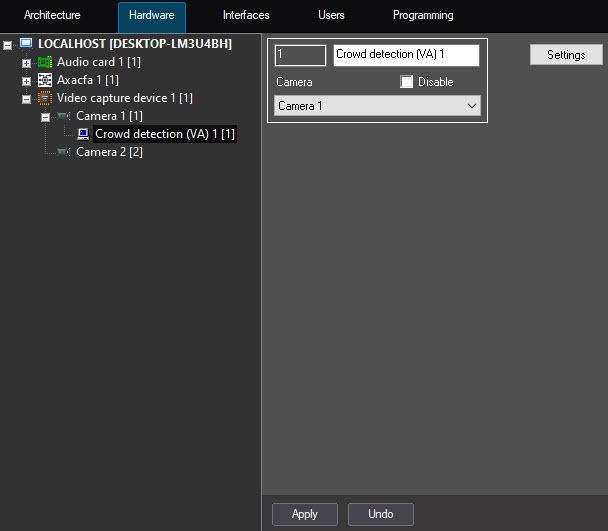
- Click the Settings button (1).
The Detection settings window opens.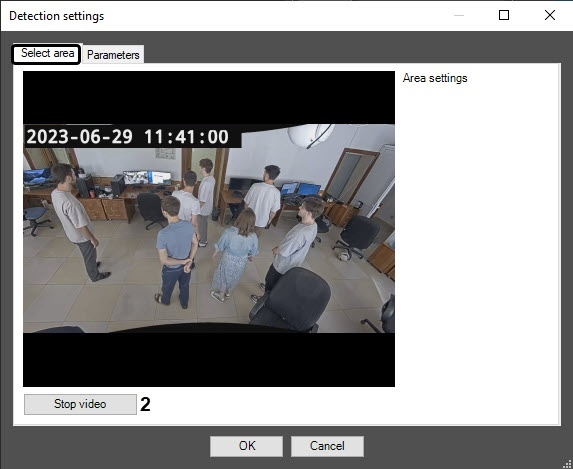
- In the Detection settings window on the Select area tab, determine surveillance areas. For this, do the following:
- Click the Stop video button to capture a frame of the video image (2).
On the captured frame of the video image (3), left-click to specify the areas, the situation in which must be analyzed (1). You can add up to three areas. They are highlighted with a red frame.
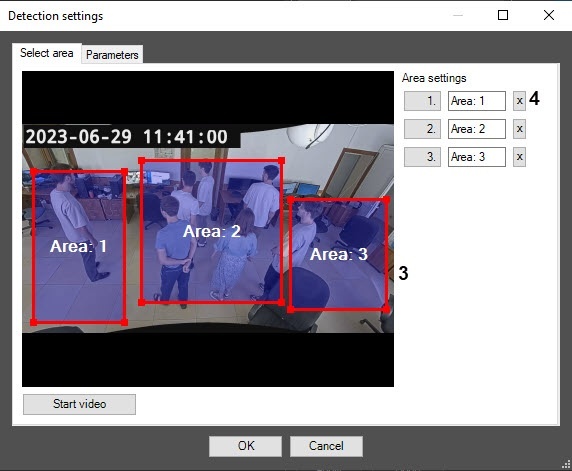
To delete an area, click the
 button next to the corresponding area (4).
- On the Parameters tab, configure the neural network settings:
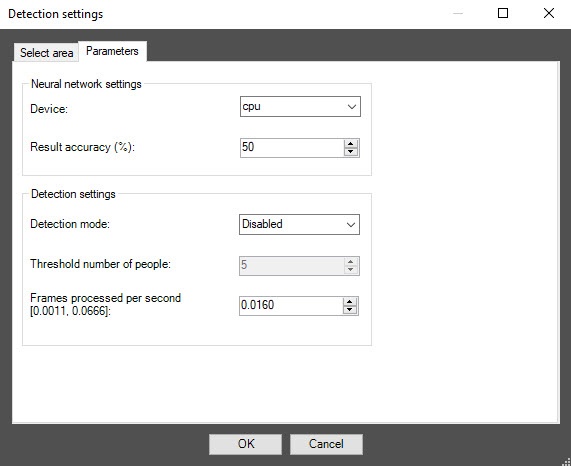
- From the Device drop-down list, select the device on which the neural network will run: cpu—central processor or gpu—NVIDIA graphics processor.
- In the Result accuracy (%) field, enter the integer value in the range from 10 to 100 as a percentage. The larger the value, the more accurate the result, but the time of frame processing increases. The default value is 50%.
- Configure the detector settings:
- From the Detection mode drop-down list, select the condition under which the detector generates an event.
- Disabled—the detector generates an event at the interval that depends on the specified number of frames processed per second at step 5c;
- If threshold exceeded—the detector generates an event if the number of people detected in the frame exceeds the threshold value (step 5b);
- If threshold not reached—the detector generates an event if the number of people detected in the frame doesn’t exceed the threshold value (step 5b).
- In the Threshold number of people field, enter the number of people detected in the frame so that the detector generates an event at step 5a. The default value is 5.
In the Number of processed frames per second [0.0011-0.0666] field, enter the number of frames per second that the detector processes. At the minimum value of 0.0011 the video image is analyzed once every 15 minutes; at the maximum value of 0.0666—once every 15 seconds.
You can see all events received from the Crowd detection (VA) object in the Event viewer interface window.
When you create the Crowd detection (VA) detector, it starts in a separate process (the value of the IsProcessObject=1 parameter of the HKEY_LOCAL_MACHINE\SOFTWARE\WOW6432Node\AxxonSoft\PSIM\DetectorExt\CROWD_ESTIMATION registry key. For more details, see the registry key guide on the Vertical solutions page. For the information on how to work with the registry, see the Working with Windows OS registry subsection).
- From the Detection mode drop-down list, select the condition under which the detector generates an event.
- Click the OK button to save changes and return to the settings panel of the Crowd detection (VA) object.
- On the settings panel of the Crowd detection (VA) object, click the Apply button.