To display frames from cameras in the generated report, it is necessary to configure the video player (see Video Player Settings). |
To create a Report by camera, do the following:
- Select the Report by camera type (see Selecting the type of general report). As a result the dialog box for specifying the report parameters will be displayed.
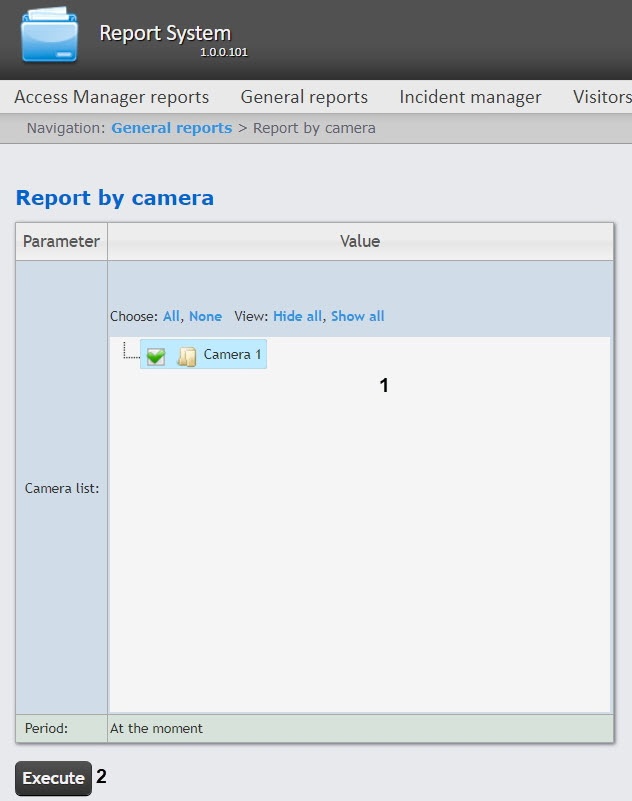
- In the Camera list (1) set the checkboxes for those camera objects for which you want to build a report. Click All to select all objects from the list. Click None to deselect. Click Show all to expand the object structure. Click Hide all to hide the object structure.
- To build a report, click the Execute button (2). As a result, a report for the selected cameras will be displayed:
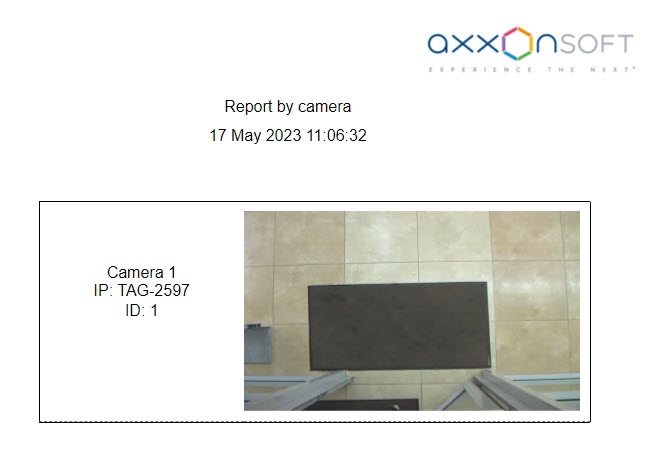
The report by camera contains the following information:
Camera name in Axxon PSIM;
Camera IP address;
Camera ID;
Frame from the camera at the time of the report generation. The frame is taken from the video stream, which is intended for recording the archive.