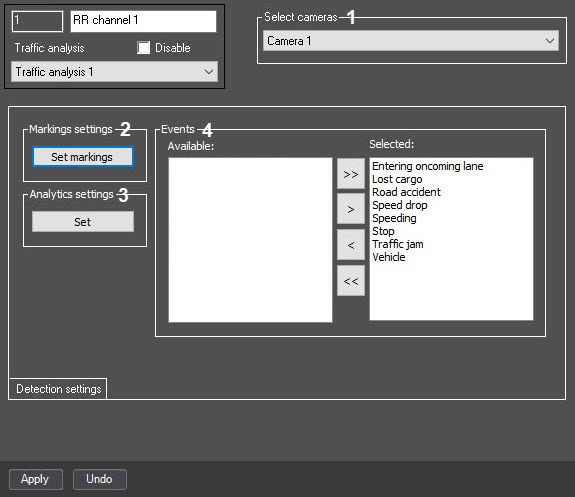
The settings panel of the RR channel object includes the following interface elements:
The table describes the elements on the settings panel of the Traffic analysis object.
| № | Parameter name | Parameter setting method | Description | Representation | Default value | Value range |
|---|---|---|---|---|---|---|
| 1 | The Select cameras group | |||||
| The camera's drop-down list | Select the value from the list | Selects the camera to work with the RR channel of the Traffic analysis module | List of available Camera objects | NA | Depends on the number of available Camera objects | |
The Detection settings tab
| № | Parameter name | Parameter setting method | Description | Representation | Default value | Value range |
|---|---|---|---|---|---|---|
| 2 | The Markings settings group | |||||
| The Set markings button | Click the button | Sets the marking | NA | NA | NA | |
| 3 | The Analytics settings group | |||||
| The Set button | Click the button | Sets the analytics | NA | NA | NA | |
| 4 | The Events group | |||||
| The Available list | Click buttons | The list of available RR channel events of the Traffic analysis module | The list of available RR channel events of the Traffic analysis module | All possible events for the Traffic analysis module | Depends on the number of available RR channel event types of the Traffic analysis module | |
| The Selected list | Click buttons | The list of events used by the RR channel of the Traffic analysis module | The list of selected RR channel events of the Traffic analysis module | NA | Depends on the number of available RR channel event types of the Traffic analysis module | |
| The > button | Click the button | Moves the selected event from the Available to the Selected list | NA | NA | NA | |
| The >> button | Click the button | Moves all events from the Available to the Selected list | NA | NA | NA | |
| The < button | Click the button | Moves the selected event from the Selected to the Available list | NA | NA | NA | |
| The << button | Click the button | Moves all events from the Selected to the Available list | NA | NA | NA | |