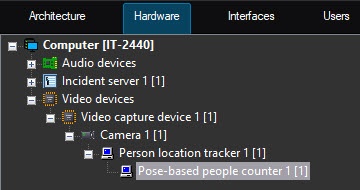
The Pose-based people counter object is created on the basis of the Person location tracker object on the Hardware tab of the System settings window. 

To configure the pose-based people counter, do the following:
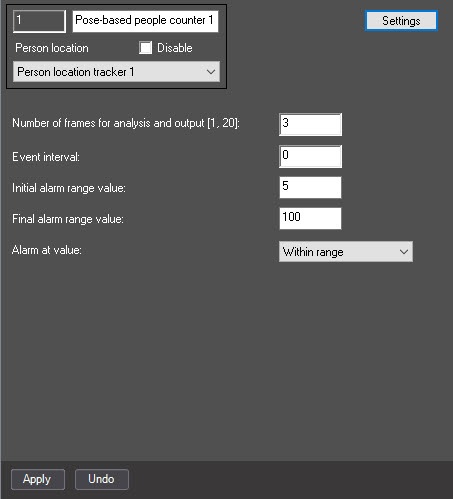
  1. Go to the settings panel of the Pose-based people counter object.

  2. In the Number of frames for analysis and output [1, 20] field, specify the number of frames in the range from 1 to 20 that are processed for specifying the number of objects on them.
  3. In the Event interval field, specify the periodicity with which the Large number of people alarm event must occur.
  4. In the Initial alarm range value field, specify the lower range border of the Large number of people alarm event.
  5. In the Final alarm range value field, specify the upper range border of the Large number of people alarm event.
  6. From the Alarm at value drop-down list, select the Large number of people alarm event generation mode:
    1. Within range—an event is generated if the counted number of people is within the range.
    2. Out of range—an event is generated if the counted number of people is out of the range.
  7. Click the Settings button to specify detection areas.
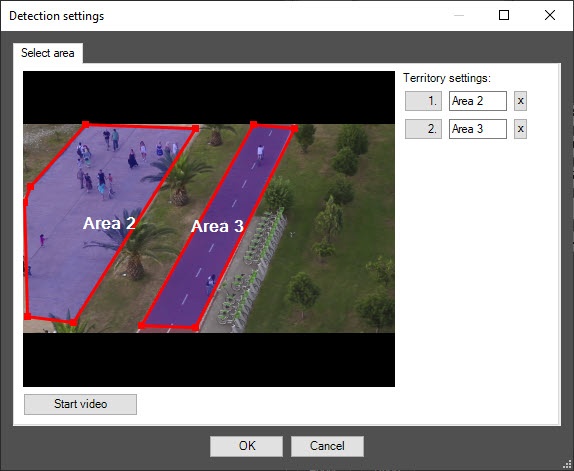
  8. Specify one or several detection areas by using the mouse in the opened detector settings window. If you don't select any area, the entire frame is analyzed.

    To pause a playback and capture a frame of the video image, click the Stop video button.

    To delete an area, click the button to the right of the area name.

  9. Click the Apply button to save the settings.

Configuring the pose-based people counter is complete.