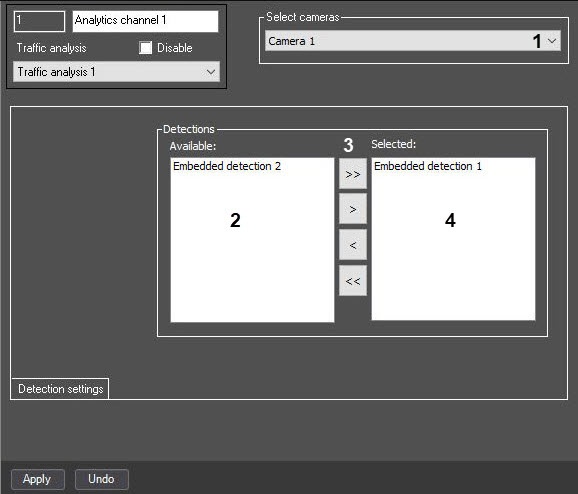
The settings panel of the Analytics channel object includes the following interface elements.
The description of the elements of the settings panel of the Analytics channel object is given in the table.
| No. | Parameter name | Method of setting the parameter value | Parameter description | Representation | Default value | Value range |
|---|---|---|---|---|---|---|
| 1 | The Select cameras group | |||||
Camera drop-down list | Select the value from the list | Selection of a camera for working with the analytics channel of the Traffic analysis module | List of available Camera objects | Camera with the lowest ID | Depends on the number of available Camera objects | |
The Detections group | ||||||
| 2 | The Available group | Automatically | The available embedded detectors are listed | List of embedded detectors registered in the system | List of all embedded detectors registered in the system | Depends on the number of embedded detectors created in the system |
| 3 | The > button | Click the button | Used to move the selected detector from the Available list to the Selected list | NA | NA | NA |
The < button | Click the button | Used to move the selected detector from the Selected list to the Available list | NA | NA | NA | |
The >> button | Click the button | Used to move all detectors from the Available list to the Selected list | NA | NA | NA | |
The << button | Click the button | Used to move all detectors from the Selected list to the Available list | NA | NA | NA | |
| 4 | The Selected group | Selected by clicking the arrow buttons | The embedded detectors that are used by the analytics channel are listed | List of embedded detectors registered in the system | NA | Depends on the number of embedded detectors created in the system |