After you start the Access Manager module, the login window opens. To connect to the module:
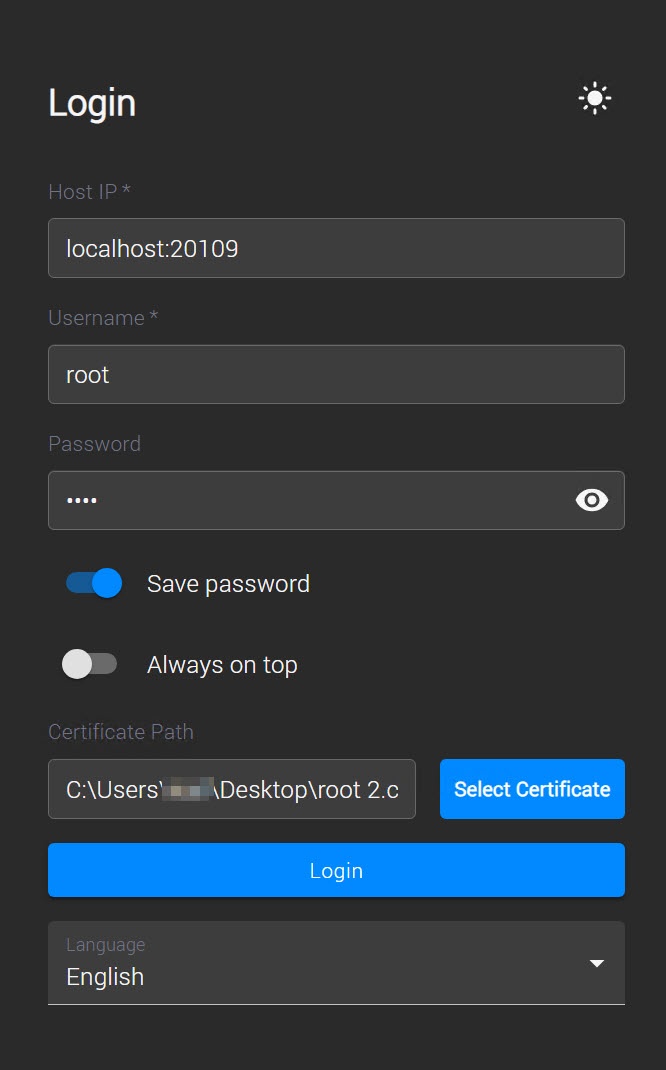
- In the Host IP field, enter the server IP address and port.
- In the Username and Password fields, enter user credentials to connect.
- Turn on the Save password toggle for future automatic login to the Access Manager.
- Turn on the Always on top toggle to display the Access Manager module on top of other windows.
- In the Certificate Path field, enter the path to the certificate.
- If you install the Access Manager module on a machine with the Axxon One client, you don't need to enter the certificate path. The certificate is specified automatically.
- If you install the Access Manager module on a separate machine without the Axxon One client, you must first copy the certificate from the Axxon One server save the certificate locally on the machine with the Access Manager module. To connect, enter the path to the local copy of the certificate in the login window.
|
- Click the Login button.
After you successfully log in, a connection to the module is established, and its main interface opens.