
Go to documentation repository
Previous page Next page
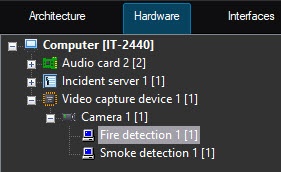
To configure the Fire detection and Smoke detection modules, do the following:
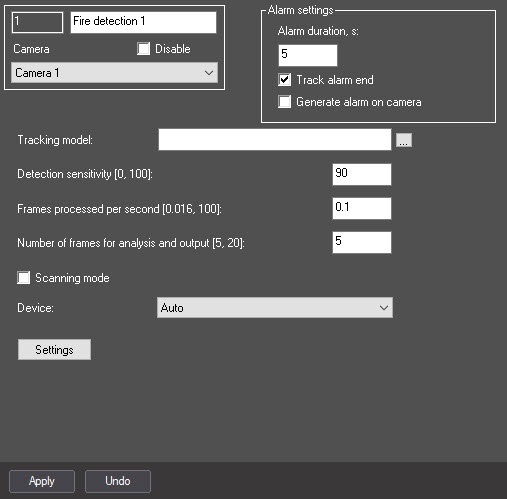
Note
If you set the Track alarm end checkbox, the events about the end of fire/smoke are received after the time specified in the Alarm duration, sec setting. If, until the end of this period, the current fire/smoke is completed and the new one is detected, the detector doesn't generate events about completing the current and starting the new alarm. The new fire/smoke event is received after the current alarm is completed.
 button to the right of the Tracking model field, and specify its file in the standard Windows Explorer window that opens.
In the Detection sensitivity [0, 100] field, enter the detector sensitivity—an integer value in the range from 0 to 100. This parameter determines at what certainty of fire/smoke detection the detector generates an alarm: the higher the sensitivity, the higher the recognition threshold. For example, at sensitivity 100, the detector neural network must get 100% certainty for some period of time during the frame processing. The value of the Detection sensitivity field is determined experimentally.
In the Number of frames for analysis and output [5, 20] field, enter the minimum number of frames in the range from 5 to 20 for the detector to analyze before generating an alarm. The higher the value, the more reliable the result of the detector operation. At the same time, if the value is too high, the short-time fire/smoke can be missed. If you enter a value less than the minimum, the value is set to 5.
Set the Scanning mode checkbox to track small objects. If you enable this mode, the load on the system increases. That is why we recommend setting the small number of frames processed per second in step 7. By default, the checkbox is cleared. For more information on the scanning mode, see Configuring the Scanning mode.
Note
You cannot configure the scanning windows for the Fire detection and Smoke detection modules. The default parameters are used.
When you use the scanning mode, we recommend using a full frame without specifying the area of interest in step 11.
Attention!
We recommend using the GPU.
It can take several minutes to launch the algorithm on the NVIDIA GPU after you apply the settings. You can use caching to speed up future launches (see Optimizing the operation of neural analytics on GPU).
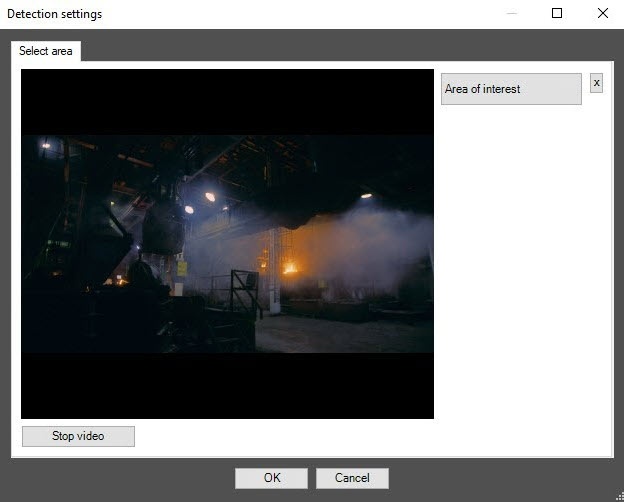
On the captured video frame, sequentially set the anchor points of the area using the left mouse button, the situation of which you want to analyze. After you add the area, the remaining part of the video image is darkened. If you don't specify the area of interest, the entire frame is analyzed.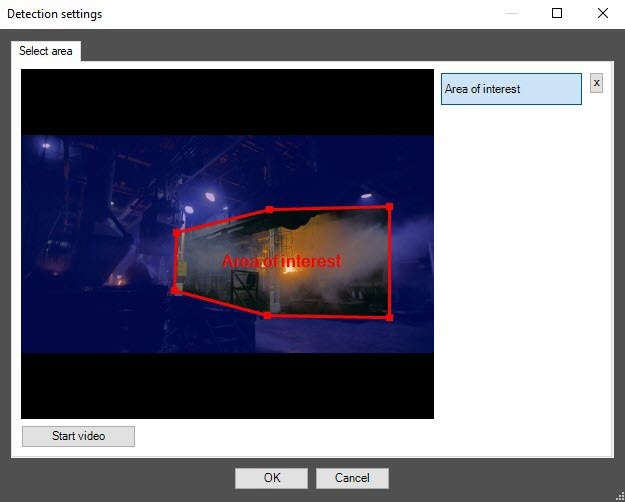
Click the OK button.
Note
To remove the area, click the  button next to the Area of interest button.
You can add only one area. If you try to add the second area, the first area is deleted.
Configuring the Fire detection and Smoke detection modules is complete.

