
Log in
Linked Applications
Loading…
Axxonsoft Documentation
Spaces
Hit enter to search
Help
Online Help
Keyboard Shortcuts
Feed Builder
What’s new
About Confluence
Log in
Axxon One 3.0/3.1 (english)
Edit space details
Pages
Blog
Go to documentation repository
Contact technical support
Search
Page tree
Browse pages
Configure
Space tools
Documentation for Axxon One 3.0/3.1 version. Documentation for
Axxon One 2.0 version
is also available.
Pages
…
Documentation
User guide
Layouts
Configuration of the interactive map
Configuring the floors
Jira links
A
t
tachments (3)
Page History
Page Information
Resolved comments
View in Hierarchy
View Source
Export to PDF
Export to Word
Copy Page Hierarchy
Removing a floor
Created by
Alina Luchkina
on
09.04.2025
1 minute read
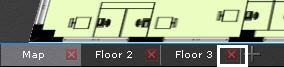
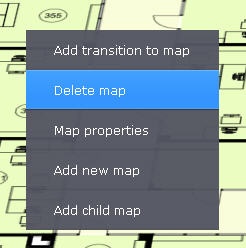
You can delete a floor in two ways:
In the lower left corner of the screen, click the
button on the tab corresponding to the floor you want to delete:
Right-click on the image of the floor you want to delete and select the
Delete map
item from the context menu:
No labels
Overview
Content Tools
{"serverDuration": 94, "requestCorrelationId": "9a20d172f6e7220b"}