
Go to documentation repository

Documentation for Axxon PSIM 2.0. Documentation for other versions of Axxon PSIM is available too.
Previous page Next page

Configure Samsung SSC-2000 telemetry control panel in Axxon PSIM as follows:
- Create the Telemetry controller object.
- Configure the Telemetry controller object as follows:
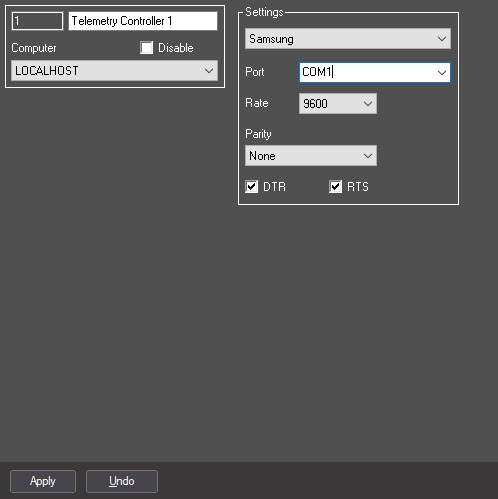
Specify the Samsung communication protocol (1).
- In the Port list, select the number of the serial (COM) port for connecting to the telemetry controller (2).
- Specify 9600 value for the Rate parameter (3).
- Specify None value for the Parity parameter (4).
- Set the DTR and RTS checkboxes checked (5,6).
- Create the Control panel object under the Telemetry controller object.
- Configure the Control panel object as described in Configuring the telemetry control panel section.
Samsung SSC-2000 telemetry control panel is now configured in Axxon PSIM.
Overview
Content Tools