
Go to documentation repository


The hidden archive is not displayed in the video surveillance monitor depending on the operator rights but is stored on the hard drive in the same way as the main archive. By default, the operator has no rights to view the hidden archive as well as to set or unset the "hidden" label to the archive records.
In order to allow the operator to perform operations with the hidden archive, do the following:
- Go to the settings panel of the User rights object.
- On the Main tab, select the Archive group.
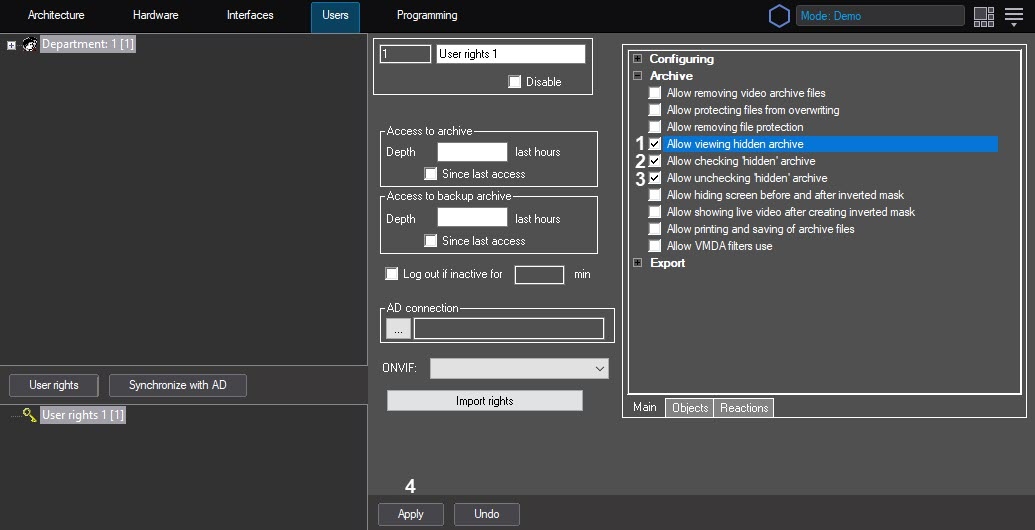
- Set the Allow viewing hidden archive checkbox (1) in order for the operator with these rights to be able to view a hidden archive.
- Set the Allow checking "hidden" archive checkbox (2) in order for the operator to be able to hide archive entries.
- Set the Allow unchecking "hidden" archive checkbox (3) in order for the operator to be able to unhide archive entries.
- Click the Apply button (4).
Restriction of rights to hide the archive is complete.
Overview
Content Tools