
Go to documentation repository
Previous page Next page
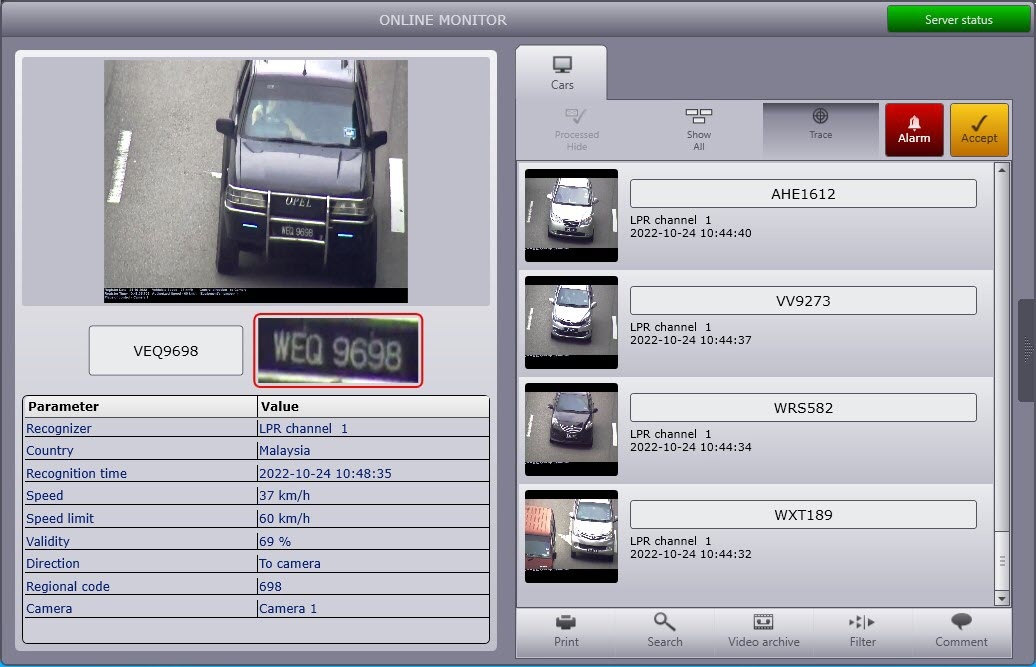
The data about the last identified vehicle is displayed in the Last event group of the Online monitor window (left area of this window).
Note
If there is an event selected in the identified vehicle protocol or in the alarm protocol, the data about this event is displayed in the Last event group (see View the identified vehicle protocol, Viewing the alarms protocol).
To view the data about the last identified vehicle, do the following:
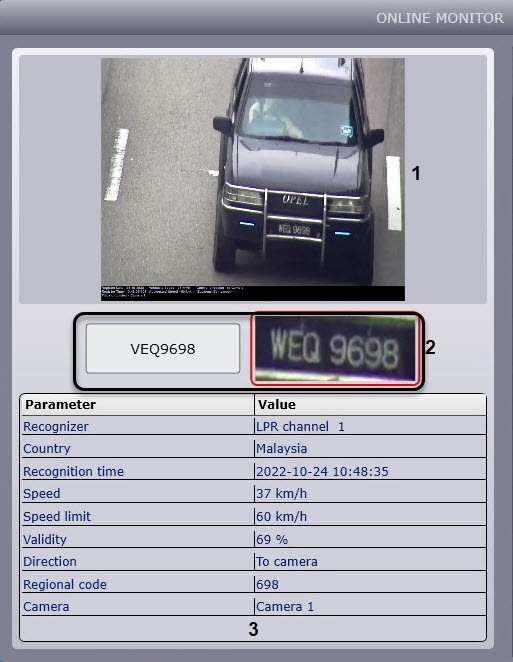
The identified license plate and license plate image are displayed in the area (2).
Note
In the Country field, the country to which the identified license plate belongs is displayed.
Note
This field is not displayed when the IV module is used for recognition.
In the Speed field, the vehicle speed is displayed.
Note
To display the current permitted speed, set the Get speed from video checkbox on the advanced settings tab of the LPR channel. To determine the vehicle's current speed, you must also specify and draw the distance in the advanced settings of the LPR channel. Otherwise, the speed and permitted speed are not displayed in the interface object.
Depending on the Vehicle Tracer settings, the speed is displayed in km/h or mi/h.
In the Speeding field, the difference between the captured vehicle speed and the speed limit allowed on this part of the road is displayed.
Note
This field is displayed if the speeding event was registered; otherwise, this field isn't displayed.
In the Regional code field, the regional code of the vehicle is displayed.
Note
You can hide this field (see Setting up the Vehicle Tracer interface window).
In the SDK data file field, the data file about the triggered module is displayed.
Note
The SDK data file field is displayed only if the AR-Railway module is used.
In the Calibration field, the calibration expiration date is displayed.
In the Vendor, Model, and Color field, the vendor, model, and color of the recognized vehicle are displayed.
Note
The Vendor, Model and Color fields are displayed only if the RR vendor and model recognizer is used.
In the Type field, the type of the recognized vehicle is displayed.
Note
This field is displayed only if the Vehicle type recognition module and/or the RR vendor and model recognizer are used.
In the Dangerous goods class and Dangerous goods composition fields, the class and the contents of the dangerous cargo are displayed correspondingly.
Note
The Dangerous goods class and Dangerous goods composition fields are displayed only if the AR-Auto module and the Hazard Identification Number Recognition Engine (ADR) are used.
In the GPS coordinates field, the coordinates of the camera installation are displayed.
Viewing the data about the last identified vehicle is complete.
Note
In case an alarm is registered for a vehicle, the reason for an alarm is also displayed in the Last event group.
The data about any event selected in the identified vehicle protocol or in the alarm protocol can be viewed in the same way (see View the identified vehicle protocol, Viewing the alarms protocol).
You can create an event about a passing vehicle using a script (see Scripts used in the Auto PSIM software package).

