
Go to documentation repository
Previous page Next page
Note
You can use templates when you create a report.
To add a new template, click Report templates → New template and fill in the Name and Description fields. The template will use the selected parameters of the current report.
Templates work the same way as templates in the scheduler and can be used interchangeably.
When you create a response using a template, click Report templates at the top of the page and select the required template from the list of saved templates (the required template is highlighted). As a result, the parameters of the current report are updated according to the selected template.
The Issued pass cards report is a table that contains the information about the time of issuing the pass card for the selected employees or departments, its type and period of validity.
To build the Issued pass cards report, do the following:
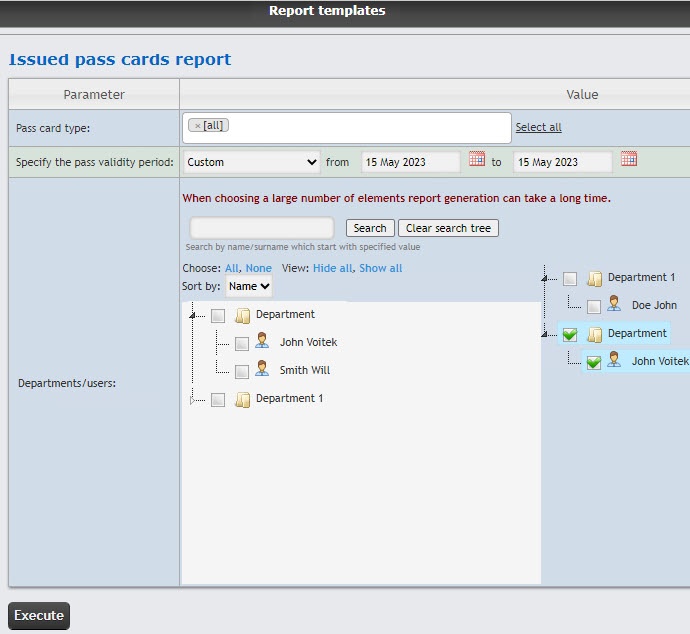
From the Specify the pass validity period drop-down list select the time period for which the report is to be created.
Note
 button near the corresponding field to use the Calendar tool.
To create a report, click Execute. As a result, the report with specified parameters is displayed.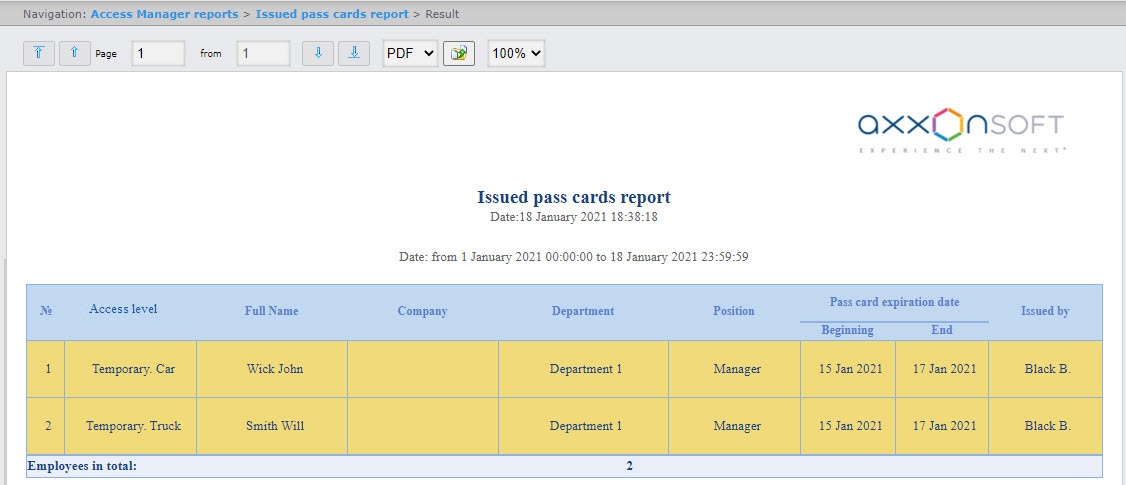
The report fields are described in the table.
| Field name | Description |
|---|---|
| Issued pass card type | Type of pass card |
| Date/Time of issue | Date and time of pass card issue |
| Period of validity (the number of days) | Pass card validity period |
| Issuing authority (individual) | Full name fo employee |
| Issuing authority (department) | Department to which the employee belongs |
| Issuing authority (access manager employee) | Full name of employee who issued the pass card |
| The Employees in total line indicates the number of issued pass cards of each type within current department | |

