
Go to documentation repository

Documentation for Axxon PSIM 2.0. Documentation for other versions of Axxon PSIM is available too.
Previous page Next page

Before you configure the points calibration in the camera FOV, you must configure the PTZ camera: create and configure the Camera object (see Configuring PTZ IP cameras), and create the corresponding Telemetry controller and PTZ device objects (see Configuring PTZ devices (Telemetry Controllers)). You can configure the points calibration in the camera FOV on the settings panel of the PTZ device object corresponding to the PTZ camera used to track objects.
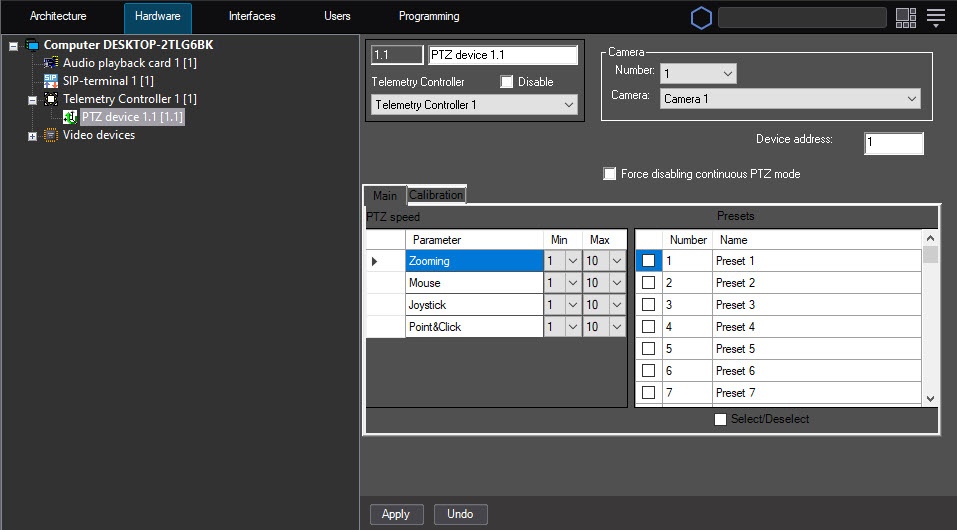
Calibration of points in the camera FOV allows you to set the correspondence between the camera absolute coordinates and the coordinate grid of the map (geographical or relative). To calibrate, you must use at least six points.
To configure the calibration of points in the camera FOV, do the following:
- Go to the settings panel of the PTZ device object corresponding to the PTZ camera used to track objects.
- Go to the Calibration tab (1).
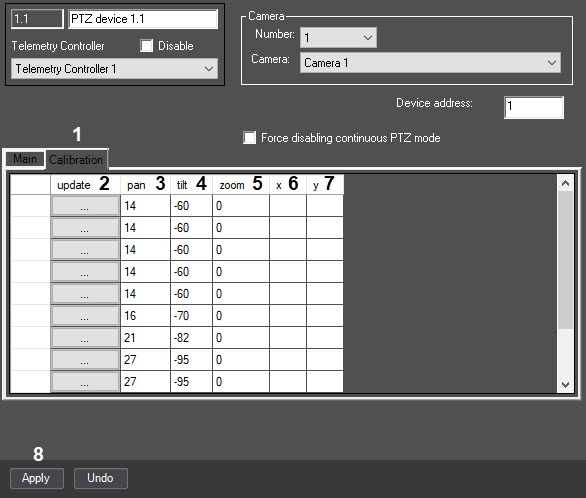
- Select a point on the interactive map.
- Rotate the camera lens so that the selected point is located approximately in the center of the video image received from the camera.
- Click the ... button in the Update column (2). As a result, the pan (3), tilt (4), and zoom (5) fields are filled with the current absolute coordinates of the camera in the corresponding line.
- In the x (6) and y (7) fields, enter the coordinates of points on the map corresponding to the selected position of the camera.
- Repeat steps 3-6 for all points of calibration.
- Click the Apply button (8).
Configuring the points calibration in the camera FOV is complete.
Overview
Content Tools