
Go to documentation repository

Documentation for Axxon PSIM 2.0. Documentation for other versions of Axxon PSIM is available too.
Previous page Next page

On the page:
Description of the interface of the Script messages tab
The Script messages tab is used to display debug windows of scripts.
The interface of the Script messages tab:
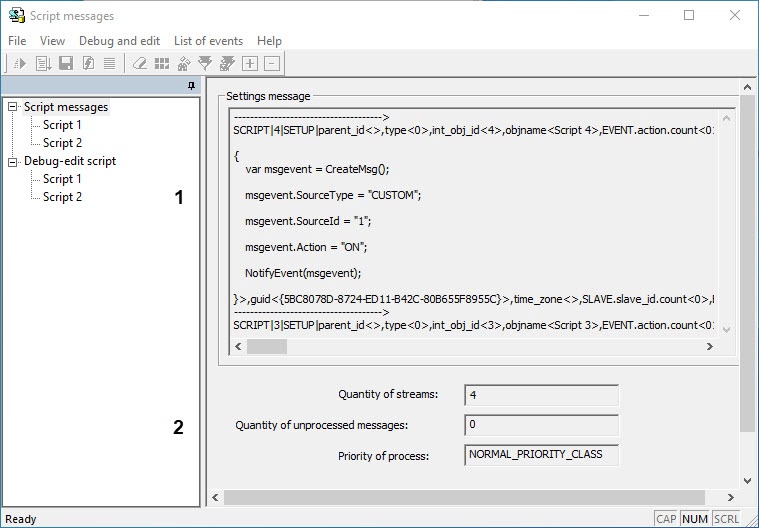
Description of the interface of the Script messages tab:
Number in the image | Parameter name | Method of setting the parameter value | Parameter description |
1 | Settings message | Automatically | Information about the initialization of the Script objects in the system |
2 | Additional information | Automatically | Additional information about scripts |
Description of the Script interface object (the Script messages tab)
The Script object of the Script messages tab is used to display system, test, and user events related to the scripts created in Axxon PSIM.
The interface of the Script object:
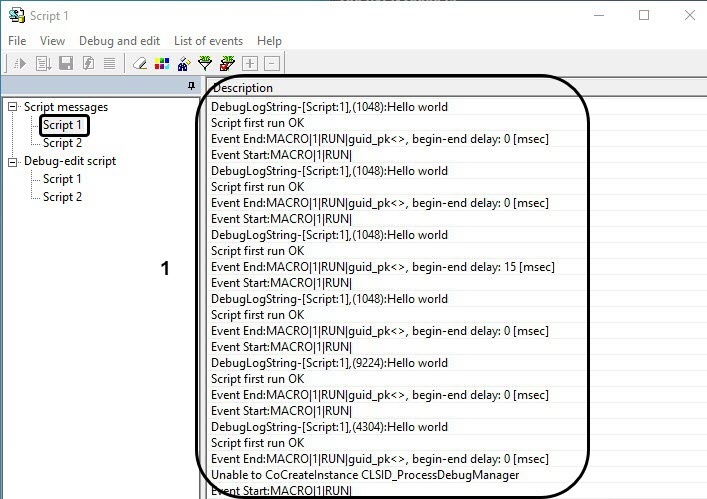
Description of the interface of the Script object:
Number in the image | Parameter name | Method of setting the parameter value | Parameter description | Characters used | Default value | Value range |
1 | Description | Automatically | Displays the information about events occurring in the system | Latin alphabet, Cyrillic and service characters | NA | By default, 200 lines are displayed in that list. You can change the value using the DebugMaxLines registry key (see Registry keys reference guide) |
Overview
Content Tools