
Go to documentation repository

Documentation for Axxon PSIM 2.0. Documentation for other versions of Axxon PSIM is available too.
Previous page Next page

On the page:
Purpose
The Audio player is used by the operator to work with the audio control subsystem that allows for audio surveillance and audio recording on the protected facilities.
Functions
The audio player has the following functions:
- Listening to the audio of an event.
- Recording the audio of an event.
- Playback of the audio generated by alarm events.
- Saving of the recorded audio as standard Windows audio files.
Note
To work with the audio player, you must connect headphones or other acoustic devices to the computer's sound card to play audio.
Interface description
The figure shows the interface of the audio player.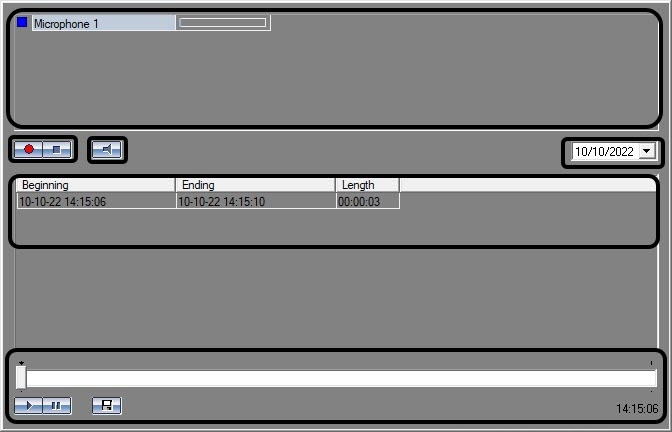
The top part of the audio player window contains the list of microphones controlled by this audio player. Each microphone has a status indicator (on the left) and a dynamic scale (on the right) of the microphone signal level (see Indicator of microphone status).
In the middle part of the audio player window, the  recording control buttons are displayed (they are also used for microphone arming and disarming) and the
  button used for turning off and on audio of the microphone, as well as a list of recordings made from the selected microphone on a given day.

Each audio has a start and end time and the duration of a recording.
You can select the date to view available recordings in the field above the list of recordings.

Below the list of audio recordings, there is a control panel for playback.
The  and
and  buttons are used to control the playback. The
  button is used to export the recording to a file.
Overview
Content Tools