
Go to documentation repository
Previous page Next page
The interface of the Traffic analysis monitor window contains the following elements.
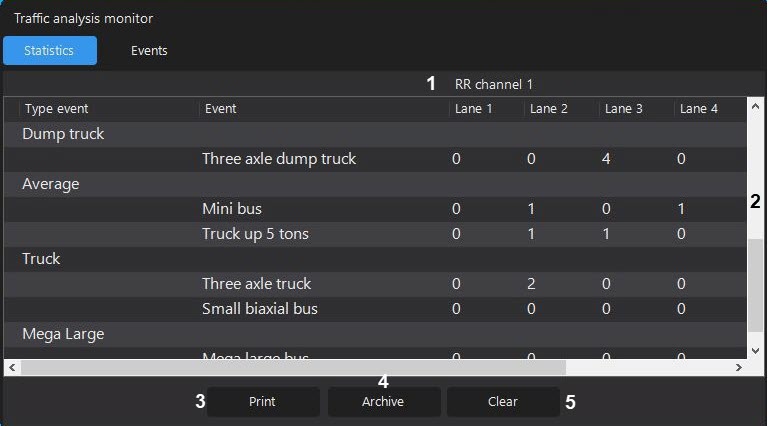
By default, the event monitoring mode is enabled. To switch to the archive mode, use the Archive button.
Description of the interface elements.
| Number of the element | Element | Description of the element |
|---|---|---|
| 1 | Data source | RR channels from which the statistic data is displayed |
| 2 | Statistic data | The table of the general statistic data received from cameras, by event types, including the number and type of the vehicle |
| 3 | The Print button | Prints the statistic data |
| 4 | The Archive button | Switches to the event archive mode from cameras |
| 5 | The Clear button | Deletes the statistic data from the table |
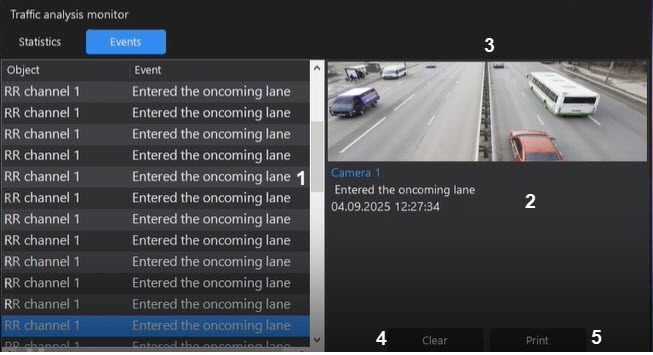
Description of the interface elements.
| Number of the element | Element | Description of the element |
|---|---|---|
| 1 | Events detected by cameras | The table of events detected by cameras |
| 2 | The information area about the selected event in the list | The information about the selected event: the camera name, the lane name, the event name, the date in the DD.MM.YYYY format, the time of detecting an event, the photo made by the camera when detecting an event |
| 3 | The photo area of the selected event in the list | The photo of the selected event made by the camera in the list |
| 4 | The Clear button | Deletes detected events by the camera from the table |
| 5 | The Print button | Prints a report about the selected Report on event (see Viewing and printing the event information in the traffic analysis monitor window) |
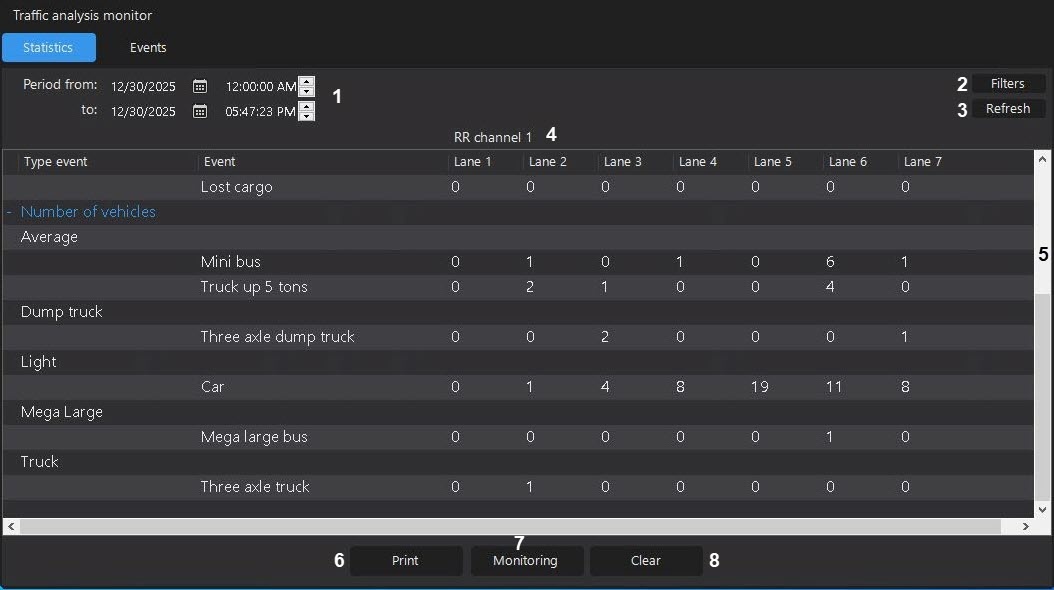
Description of the interface elements.
| Number of the element | Element | Description of the element |
|---|---|---|
| 1 | The Period from and to fields | The beginning and ending of the period of the data receiving, the values of which are set using the arrows and a calendar |
| 2 | The Filters button | Opens the window for selecting filters by the detector, by an event, or by the vehicle of this detector |
| 3 | The Refresh button | Refreshes the list of events |
| 4 | The data source | RR channels from which the statistic data is displayed |
| 5 | Detected events | The table of events detected by cameras |
| 6 | The Monitoring button | Switches to the event monitoring mode |
| 7 | The Clear button | Deletes detected events by the camera from the table |
| 8 | The Print button | Prints a report about the selected Report on event (see Viewing and printing the event information in the traffic analysis monitor window) |

