
Go to documentation repository


The Symmetry Monitor is managed in the Map interactive window using the Monitor object functional menu:
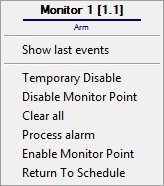
The Symmetry Monitor object functional menu commands description is given in the table.
Menu command | Function performed |
|---|---|
| Temporary Disable | Temporary disable |
| Disable Monitor Point | Disable the monitor point |
| Clear all | Clear all alarms |
| Process alarm | Confirm the alarm |
| Enable Monitor Point | Enable the monitor point |
| Return To Schedule | Return to the schedule |
The Symmetry Monitor object can have the following states:
| (M4000) Monitor Point Logic 1 |
| (M4000) Monitor Point Logic 2 |
| (M4000) Monitor Point Logic 3 |
| (M4000) Monitor Point Gnd Short |
| (M4000) Monitor Pnt Break A to Gnd |
| (M4000) Monitor Pnt Break B to Gnd |
| (M4000) Monitor Point Break |
| (M4000) Monitor Point Short |
| (M4000) Monitor Point A to Gnd |
| (M4000) Monitor Point B to Gnd |
| (M4000) Monitor Point Leak |
| (M4000) Monitor Point Active |
| (M4000) Monitor Pnt F-back Active |
| (M4000) Monitor Pnt F-back Inactive |
| (M4000) Leak A to Gnd |
| (M4000) Leak B to Gnd |
| (M4000) Unknown State |
| (M4000) Monitor Point Tamper Alarm |
| Monitor Point Circuit Open |
| Monitor Point Circuit Shorted |
| Monitor Point In Alarm |
| Monitor Point Tamper Alarm |
| Alarm |
| Arm |
| Alarm |
| Normal |
| Cable Fault Open |
| Cable Fault Short |
| Disabled |
| Normal or Alarm |
| Cable Fault Open |
| Tamper Point in Alarm |
| Enabled |
| Cable Fault Short |
| Cable Fault Open |
| Tamper Alarm or Tamper |


Overview
Content Tools