
Go to documentation repository

Documentation for Axxon PSIM 2.0. Documentation for other versions of Axxon PSIM is available too.
Previous page Next page

Every IP device used for the audio input is registered in Axxon PSIM by creating and configuring the Audio card object. The Audio card objects are created on the Hardware tab on the basis of the Computer object. When you create the Audio card objects, you must select the value from the Board drop-down list corresponding to the designation of the IP audio input device, followed by its IP address for each IP device. This value is available in the drop-down list only if you create and configure the Video capture device object corresponding to the IP device (see the Configuring video acquisition from IP devices section). Besides, the Audio card and Video capture device objects corresponding to the one physical IP device must be created on the basis of the same Computer object.
The example of configuring the Board parameter of the Audio card object for the Axis camera is shown in the figure:
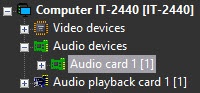

After you configure the Audio card objects, you must restart Axxon PSIM. Otherwise, you cannot proceed with configuring the audio subsystem (particularly, microphones).
The microphones embedded into or connected to IP devices are registered in Axxon PSIM by creating the Microphone objects on the basis of the Audio card object. On the basis of one Audio card object, you can place the Microphone objects in the number corresponding to the amount of audio input channels of the configured IP device and restrictions applied by the license activation key. The corresponding segment of the hardware tree with the registered IP device and one microphone is shown in the figure:
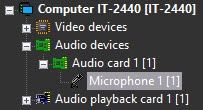

After you register the Microphone object, you must select the connection channel number of a microphone to the audio input device from the Channel drop-down list.
Besides, you can set the driver parameters to receive audio from the IP device. The list of available parameters depends on the device used, and is shown in the Driver parameters table on the settings panel of the Microphone object.
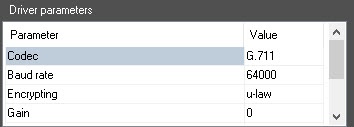
In particular, you can set the audio digitization rate (Sample rate) in this way. The value of the Digitization parameter set on the settings panel of the Audio card parent object is ignored. For more information on how to select the codec and the digitization rate in Axxon PSIM, see the Configuring the digitization devices for audio signals section in Administrator's Guide.
If a video comes delayed or advanced, and the sound goes "ahead" or "behind" of it, you must select the value of the Audio delay parameter correspondingly. You can set the value from -10000 to 10000.

Overview
Content Tools