
Go to documentation repository

Documentation for Axxon One 2.0. Documentation for other versions of Axxon One is [available too].
Previous page Next page

To connect the Client to the Failover Server behind NAT, do the following:
Create a cluster and add Servers to it (see 클러스터 생성).
- On one of the cluster Servers, via which the Client will connect to the Failover Server behind NAT, in the C:\Program Files\AxxonSoft\Axxon One\bin\raft-settings.xml file, specify the port value for the SVISOR_GRPC_PROXY_PORT parameter. For example, specify port 4001 (see Ports used by the Axxon One Software Package).
- Forward ports 4000 and 4001 to the internal IP address of the Server specified in step 2.
Start the Client and in the proxy server settings, specify the Server external IP address and the forwarded port from step 2 (see Axxon One 클라이언트 시작).
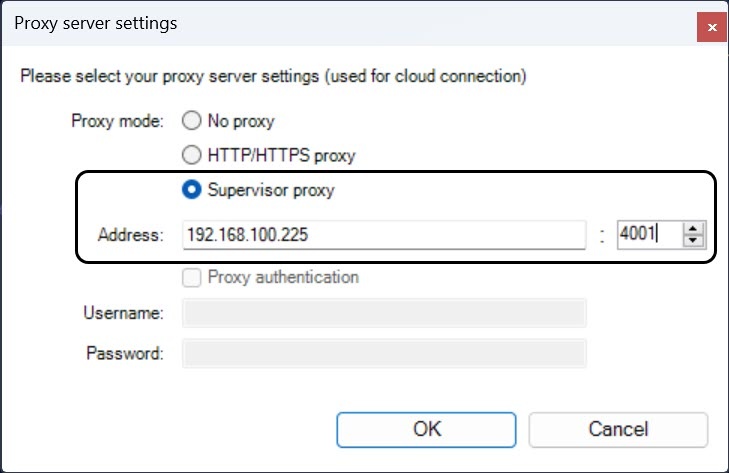
- Enter the external IP address of the cluster Server (1) and click the
 button.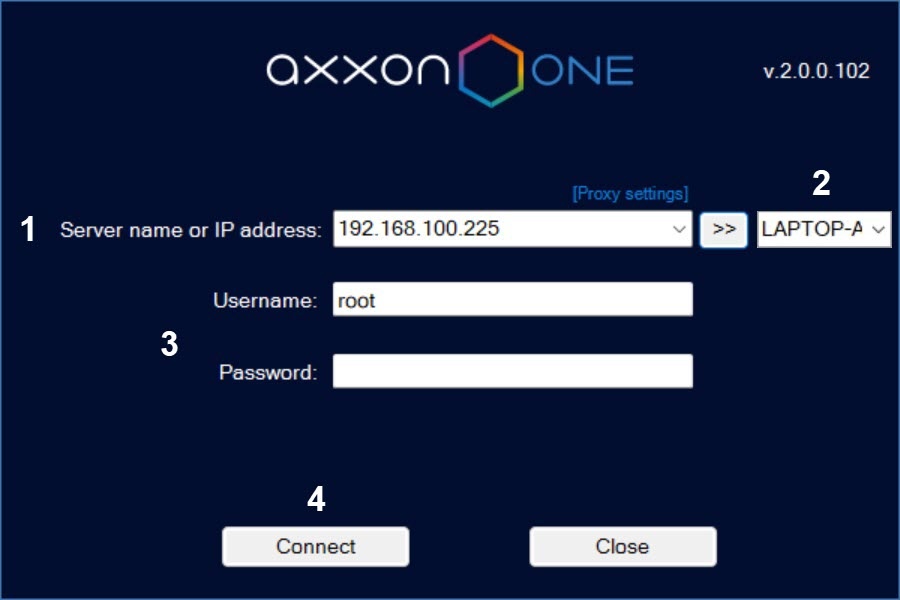
From the list (2), select the node you want to connect to. To quickly find the node, you can enter the first characters of its name in this field.
- Enter the username and password (3) and click the Connect button (4).
Attention!
If the connection to the Server to which the ports are forwarded fails, the connection to the cluster nodes behind NAT becomes unavailable. If necessary, configure the network infrastructure so that a proxy server is configured for multiple cluster Servers. This will provide fault tolerance and the ability to connect to the cluster even if one of the Servers becomes unavailable.
Overview
Content Tools