
Go to documentation repository

Documentation for Axxon PSIM 2.0. Documentation for other versions of Axxon PSIM is available too.
Previous page Next page

The dbi file preparation is performed using the ddi.exe utility. For more details on how to work with it, see The ddi.exe utility for editing database templates and external settings file.
To create the dbi file for the objects of the CUSTOM and CUSTOM_CHILD types, use the following order:
- Run the ddi.exe utility (see The ddi.exe utility for editing database templates and external settings file).
- Go to the DBI tab.
Create two OBJ_CUSTOM and OBJ_CUSTOM_CHILD objects as shown in the figure below.
Attention!
The object names (tables) must look like OBJ_<object type>.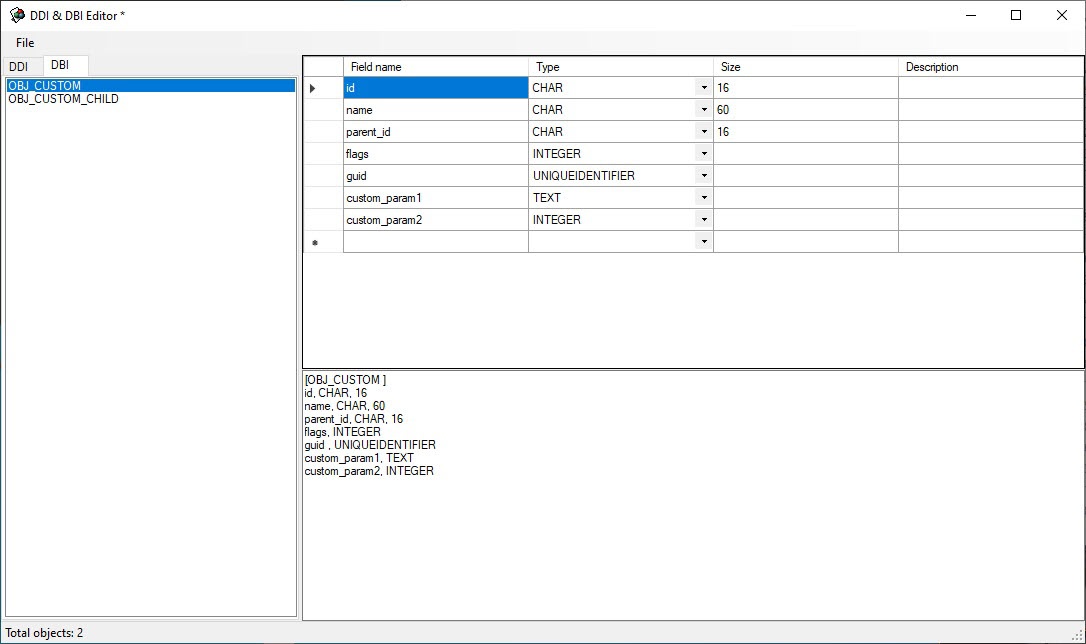
- Set parameters for each object. The id, name, parent_id, flags, guid parameters are mandatory for all objects. Custom_param1, custom_param2 in the example on the figure are custom parameters. You can also set other parameters used in Axxon PSIM. For example, you can add the region_id parameter, which allows setting areas and regions for an object (see Subdivision of the protected facility into areas and regions).
- Save changes using the Save command in the File menu. The saved file must have the dbi extension and must be located in the Axxon PSIM installation directory, for example, C:\Program Files (x86)\Axxon PSIM\psim.custom.dbi.
The dbi file preparation is complete.
Overview
Content Tools