
Go to documentation repository

Documentation for Axxon PSIM 2.0. Documentation for other versions of Axxon PSIM is available too.
Previous page Next page

For push notifications to operate in Axxon PSIM, you must authorize the server in the AxxonNet service.
Attention!
To complete the authorization, the Axxon PSIM license key is required (see License key).
If you delete the Web server 2.0 object, the server authorization is automatically canceled. If you delete Axxon PSIM without canceling the server authorization (manually or automatically when you delete the Web server 2.0 object), you cannot authorize the server again using the same Axxon PSIM license file.
To authorize in the cloud service, do the following:
- On the Hardware tab (1) of the system settings window, create the Cloud authorization object (2).
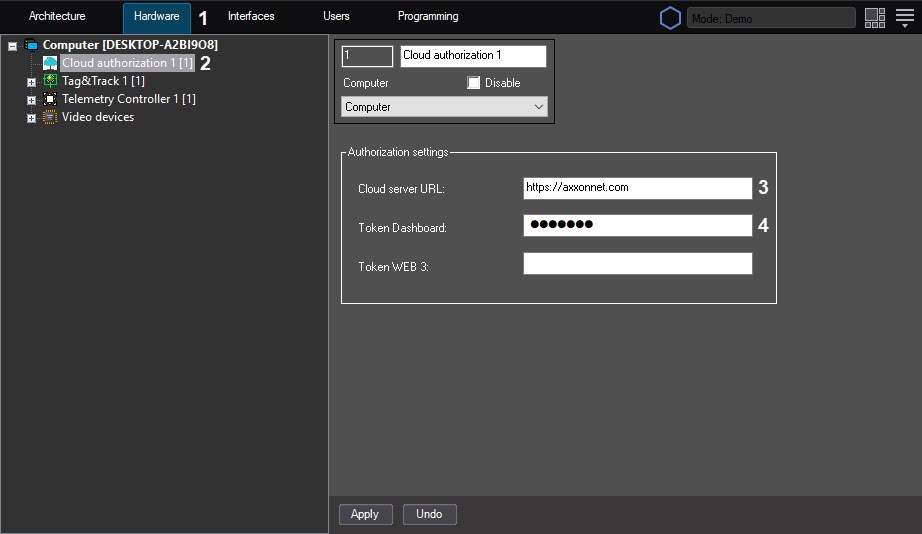
- In the Cloud server URL field (3), enter the URL address of the cloud server. By default: https://axxonnet.com.
- In the Token Dashboard field (4), enter the token for authorization of the Web server 2.0 object obtained in the cloud. For information on how to get a token for AxxonNet, see Configuration of a domain in AxxonNet.
- Click the Apply button to apply the settings.
Server authorization in the cloud for push notifications is complete.
Overview
Content Tools