
Go to documentation repository

Documentation for Axxon PSIM 2.0. Documentation for other versions of Axxon PSIM is available too.
Previous page Next page

The Connection section is used for setting up the automatic connection between the client and backup video servers in case of connection loss with the main server. In the Connection section, you must specify the network names and IP addresses of the backup video servers, as they aren't listed in the registry by default.
The settings panel of the Connection section is shown in the figure.
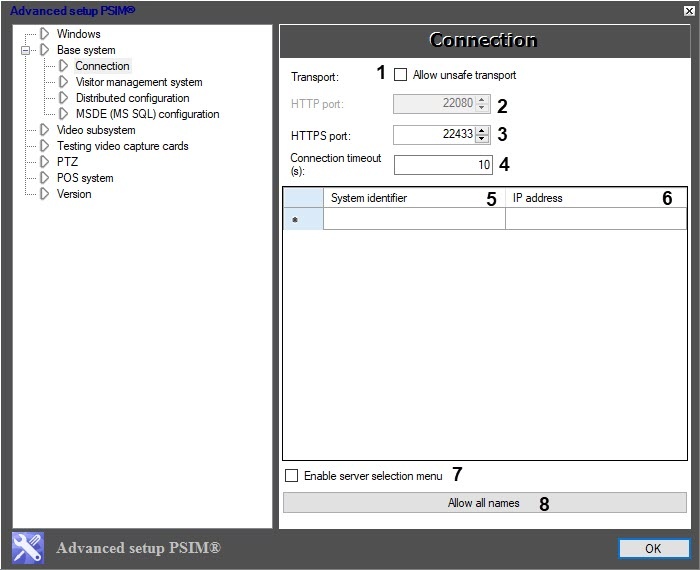
The table describes the setting parameters of the Connection section.
№ | Parameter name | Method for setting the parameter value | Parameter description | Representation | Default value | Value range |
1 | The Allow unsafe transport checkbox | Set the checkbox | Enables the access to the use of the unsecured port (HTTP port) Note. To save the connection between servers with different ports for data transmission (HTTP, HTTPS), the value of this setting for both of them must be the same | Boolean type | Clear | Set—HTTPS and HTTP ports are used for data transmission Clear—HTTPS port is used for data transmission |
2 | The HTTP port field | Enter the value in the field. Note. The value is entered using the keyboard, or by using the up and down arrows | Sets the number of the unsecured port that is for data transmission Note. The field is inactive if the Allow unsafe transport checkbox isn't set | Positive integers | 22080 | NA |
| 3 | The HTTPS port field | Enter the value in the field. Note. The value is entered using the keyboard, or by using the up and down arrows | Sets the number of the secured port that is used for data transmission | Positive integers | 22433 | NA |
| 4 | The Connection timeout (s) field | Enter the value in the field | Sets the time in seconds after which the client automatically connects to backup video servers in case of connection loss with the main server | Seconds | 10 | From 0 to 999999999 |
5 | The System identifier field | Enter the value in the field | Sets the network name of the backup video server if the connection with the main server is lost | NA | NA | Depends on the network settings of the backup video server |
6 | The IP address field | Enter the value in the field | Sets the IP address of the selected backup video server | IP address | NA | Depends on the network settings of the backup video server |
7 | The Enable server selection menu checkbox | Set the checkbox | Enables the server selection menu. Note. You can connect several servers at once | Boolean type | Clear | Set—operator can enable the server selection menu Clear—operator cannot enable the server selection menu |
8 | The Allow all names button | Click the button | Adds automatically the computers' IP addresses, set in the System identifier column, to the IP address column if these IP addresses are enabled and identified | NA | NA | NA |
Note
To delete the specified server, select it in the list (click the row) and press Ctrl+Del on the keyboard.
Overview
Content Tools