
Go to documentation repository
Documentation for Axxon One 3.0/3.1 version. Documentation for Axxon One 2.0 version is also available.

Face contacts search allows you to find in the archive all people who contacted with any person for a specified time.
The search algorithm works as follows:
- Finds all people in the archive who look like the person from the uploaded photo.
- Analyzes the archive fragments, in which there is a person from the photo and other people are present as well.
To search for face contacts, do the following:
- Set the search interval (see Setting a search interval).
- Set the similarity level (in %) between the face in the photo and the faces from the archive (1). If the similarity level is below the set value, these results are ignored during the search.
Note
By default, the similarity level is 75%. Starting with the Axxon One 2.0.10, the minimum allowable similarity level is 40%.
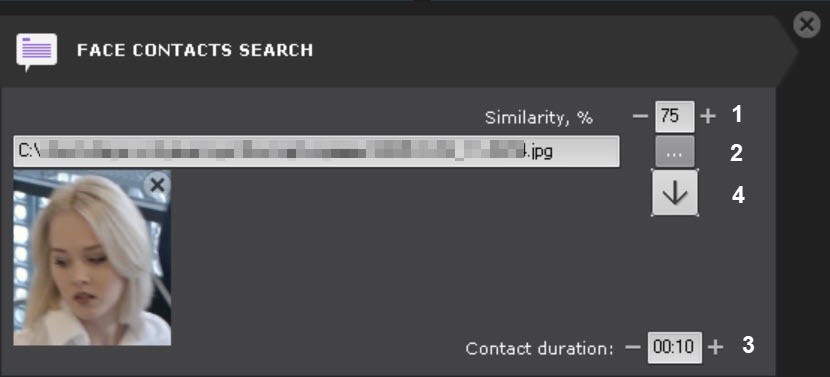
- Select a photo of the person whose contacts you want to find (2). Supported formats: png, jpg, jpeg, jpe. When you click the face in the Surveillance window, this face is selected for search. If you do not select a photo, then all faces recognized during the specified time are displayed. To delete a photo from the search, click the
 button.
 - Set the minimum contact time of other persons in the frame with the person on the photo in the MM:SS format (3). If the contact time is below the specified value, these results are ignored during the search. The maximum contact time is 59 seconds.
Click the Search button
 .
.Note
Once started, the search can be stopped at any time. To do this, click the Stop button, which appears in place of the Search button.
This starts a search based on the specified criteria.
The search results panel displays video frames that contain persons who contacted with the person on the photo. Recognized faces are outlined with a red border.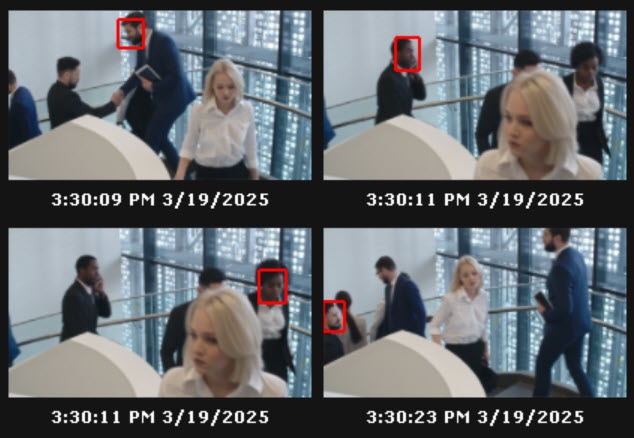
To instantly export a face image from the frame, do the following:
- Click a face track in the Surveillance window.
- Click the
 button (4).
The face image is saved to the folder specified in the settings (see Export).
Overview
Content Tools