
Go to documentation repository

Documentation for Axxon PSIM 2.0. Documentation for other versions of Axxon PSIM is available too.
Previous page Next page

To check the frame's authenticity, do the following:
- Start the SignCheck.exe utility (see the Starting and shutting down the SignCheck.exe utility section).
- Select the file of the exported frame, the authenticity of which you want to check using the standard dialog window of file search that is opened by clicking the
 button.
As a result of selecting the SignCheck.exe utility in the dialog window, the information about the selected frame is displayed.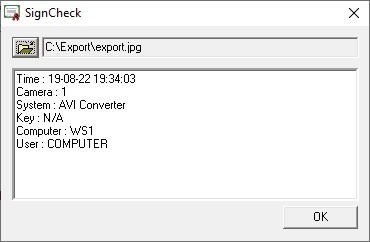
The following data is given for each frame:- AxxonSoft export frame—digital signature title.
- Frame time—date and time of this frame in the video recording.
- Export time—date and time of frame exporting of this video to a file.
- Camera—ID of the camera from which the recording is made.
- System—the software that made the recording.
- Computer—name of the computer on which this software is installed.
- User—user name of this computer.
If the frame cannot be authenticated, or the digital signature is missing, the Verification failed message is displayed.
Overview
Content Tools