
Go to documentation repository

Documentation for Intellect 4.11.0-4.11.3. Documentation for other versions of Intellect is available too.
Previous page Next page

General request format:
GET http://IP-address:port/web2/secure/kartas/{plan}/layers/{base}/points/
Request parameters:
| Parameter | Is required | Description |
|---|---|---|
| plan | No | Map ID |
| base | No | Layer ID |
Request example:
GET http://127.0.0.1:8085/web2/secure/kartas/2/layers/2/points/
Response example:
Note.
If the display type of the object on the map is different from Image, then an empty response is received. See also Attaching objects to the layers of interactive map
<points>
  <point>
    <id>CAM:1</id>
    <layerId>2</layerId>
    <mapId>2</mapId>
    <angle>0.0</angle>
    <geo_angle>0.0</geo_angle>
    <latitude>43.47727</latitude>
    <longitude>43.602381</longitude>
    <x>95.0</x>
    <y>329.0</y>
  </point>
</points>
Response parameters:
| Parameter | Description |
|---|---|
| id | Object ID in the format "TYPE:ID", for example "CAM:1" |
| layerId | Layer ID |
| mapId | Map ID |
angle | Object icon rotation angle |
geo_angle | Viewing angle (for camera, see Configuring the camera viewing angle display on the Map) |
latitude | Latitude (point coordinate). The parameter has non-zero value if:
|
longitude | Longitude (point coordinate). The parameter has non-zero value if:
|
| x | X coordinate of the upper left corner of the object icon |
| y | Y coordinate of the upper left corner of the object icon |
The coordinate plane is attached to the layer as follows:
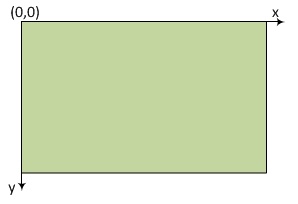
I.e. x and y cannot be negative, but can be fractional.
Overview
Content Tools