
Go to documentation repository
Documentation for Axxon One 3.0/3.1 version. Documentation for Axxon One 2.0 version is also available.

Keywords can be highlighted in the titles.
To configure keywords, do as follows:
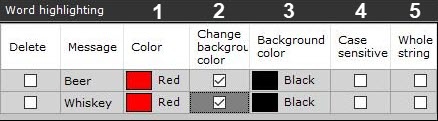
Select any number of keywords in the Word highlighting group with the + button. Double click a keyword to edit it.
Note
To remove words, set their Delete checkboxes and click the − button.
- You can also configure these parameters:
- Highlighting color (1). In the appropriate column, click the
 button and choose a color.
 If you want to change the color of the background of the titles output in the camera window, set the corresponding checkbox (2) and select the required color (3) when this word appears.
- Set the Case sensitive checkbox if you want (4).
- To highlight the whole line, set the Whole string checkbox (5).
- Highlighting color (1). In the appropriate column, click the
- Click the Apply button.
You have configured highlighting for keywords.
Overview
Content Tools