
Go to documentation repository


To work with the BACnet Server integration module, you must install and configure the AxACFA feature. For more details, see Connecting and configuring the AxACFA feature.
To configure the BACnet Server parent object, do the following:
- Go to the settings panel of the BACnet Server parent object that is created on the basis of the Axacfa object on the Hardware tab of the System settings window.
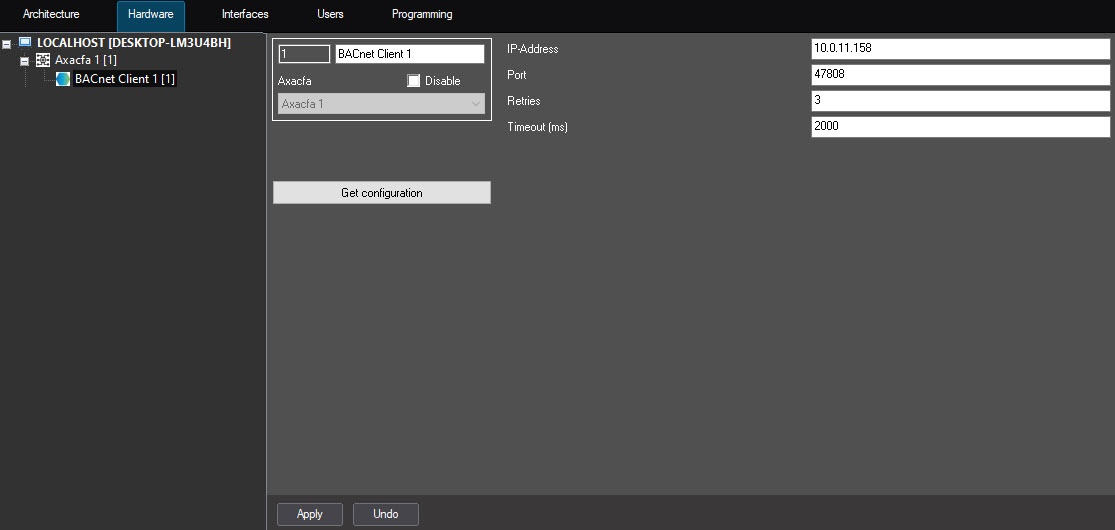
- In the IP Address field, specify the IP address of the device that is connected via the BACnet protocol.
- In the Port field, specify the number of the port to connect to the BACnet device. The default port is 47808.
- In the Retries field, specify the number of attempts to connect to the BACnet server. The default number is 3.
- In the Timeout (ms) field, specify in milliseconds the time interval between attempts to connect to the BACnet server. The default value is 2000.
- Click the Apply button to apply the settings.
- Click the Download configuration button.
As a result, the BACnet configuration is downloaded, and the hardware tree is built: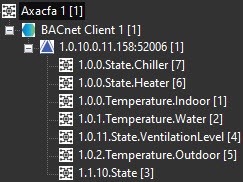
Configuration of the parent object is complete.
Overview
Content Tools