
Go to documentation repository

Documentation for Axxon PSIM 2.0. Documentation for other versions of Axxon PSIM is available too.
Previous page Next page

To configure the password policy, do the following:
- Go to the Programming tab and select the Security zone object.
- On the settings panel of the Security zone object, go the Password policy tab.
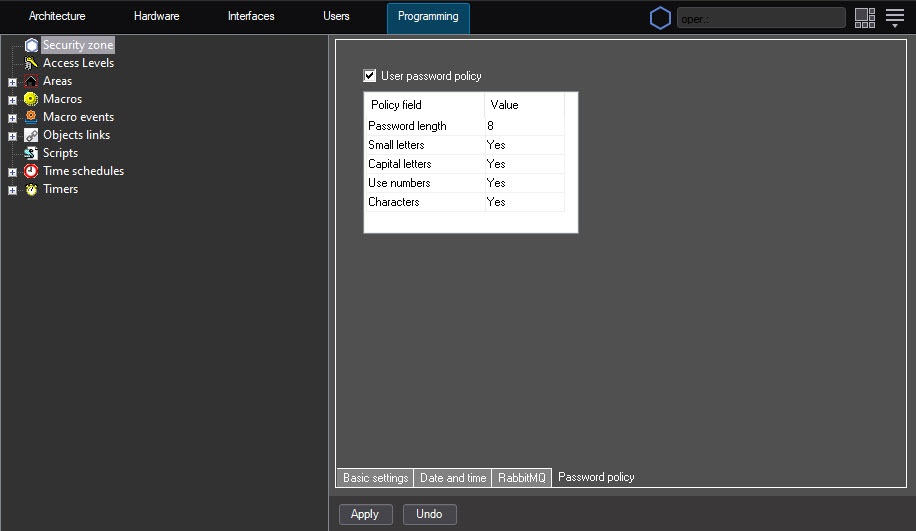
- If you want to change password settings, set the User password policy checkbox.
- In the Password length field, enter the password length. The default value is eight characters.
- Select the Yes or No value for each parameter depending on the requirements for the password complexity:
- Small letters—a password must contain at least one letter of the lowercase.
- Capital letters—a password must contain at least one letter of the uppercase.
- Use numbers—a password must contain at least one number.
- Characters—a password must contain at least one special character.
Note
We recommend setting the Yes value for all parameters to ensure the maximum security.
- Click the Apply button.
Note
Changes take effect after you click the Apply button, and then you cannot enter a password that doesn't meet the requirements.
If you enter an inconsistent password, the following message appears: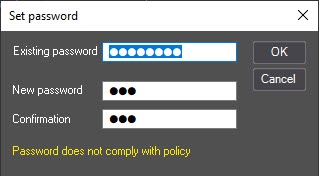
Configuring the password policy is complete.
Note
If you create the user account before changing the password policy and its password doesn't meet the new requirements, you must not change it.
Note
Login and password are stored in the database in encrypted form. The data are transferred between servers/remote administrator’s workstations and remote clients in encrypted form as well.
Overview
Content Tools