
Go to documentation repository

Documentation for Axxon PSIM 2.0. Documentation for other versions of Axxon PSIM is available too.
Previous page Next page

The amount of RAM allocated for the operation of the SQL server is used to store the data, functions, and other internal structures. By default, the RAM value is determined by the total RAM resources available for the SQL server in the system. The tweaki.exe utility settings allow limiting the amount of RAM used for the SQL server operation. To do this, do the following:
- Shut down Axxon PSIM if it is running on the computer.
- Start the tweaki.exe utility (see the Starting and shutting down the tweaki.exe utility section).
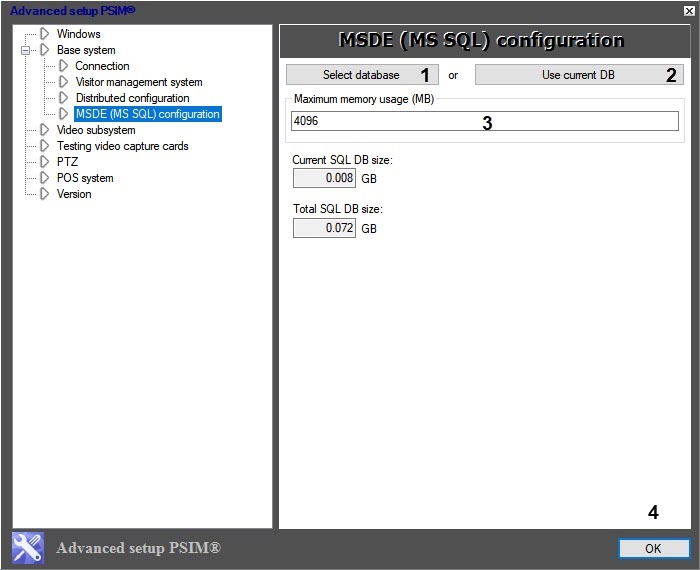
- Select the MSDE (MS SQL) configuration section in the tree located on the left side of the utility dialog window (see The settings panel of the MSDE (MS SQL) configuration section).
- Select the MS SQL database for which you want to limit the usage of RAM by using the Select database (1) or Use current DB (2) buttons.
- In the Maximum memory usage (MB) (3), enter the amount of RAM allocated for the SQL server operation.
- Click the OK button (4).
Overview
Content Tools